Most people do not abandon their goals. They lose track of them. The goal is written down somewhere — a note, a document titled "2026", the first page of a notebook — and 3 weeks later the work has moved into a task list that has never heard of it. By April, nobody could say whether the goal is 10 percent done or 60 percent done without reconstructing a quarter of your own history.
A goal tracker app is supposed to close that gap. Many of them do not, because they store the goal and leave the work somewhere else. This is a comparison of 5 options against one test: does the app know whether you are actually moving?
The short answer
- You want progress calculated from the work, with habits underneath: EvyOS.
- You want to design your own tracker and enjoy maintaining it: Notion.
- You want a task list with a habit tracker attached: TickTick.
- Your real problem is too many tasks, not a lack of direction: Todoist.
- You have 3 goals and check them monthly: a spreadsheet. Honestly.
The word to look for is calculated. A progress tracker app that asks you to type a percentage is a mood diary with a progress bar on it.
What a goal tracker actually has to do
4 things, in order of how often they are missing.
A goal has to be its own record. Not a task with a long name, not a project with a fancy title. A goal has a category, a priority, a target date and milestones with their own dates. Model it as a task and you get a checkbox that is unticked for 11 months and then ticked once, which tells you nothing on any of the days in between.
Progress has to be calculated, not typed. The moment a percentage is a number you enter by hand, it becomes a mood reading. You put 40 percent in March because March felt productive. Progress is only useful if it is derived from the work underneath — the projects and tasks that actually constitute the goal.
Something daily has to sit underneath it. Almost every real goal decomposes into a repeated behaviour and a set of one-off pieces of work. A tracker that holds the goal but not the habit is holding the least actionable half.
The goal has to be visible without being sought. If seeing your goals requires opening a second app and navigating to a page, you will see them in January and in December.
| Goal as its own record | Calculated progress | Habits underneath | Visible in the daily view | |
|---|---|---|---|---|
| EvyOS | Yes | Yes | Yes | Yes |
| Notion | If you build it | If you write the rollups | If you build it | If you build it |
| Todoist | No | No | No | Tasks only |
| TickTick | No | No | Yes | Tasks and habits |
| Things 3 | Areas, loosely | No | No | Tasks only |
1. EvyOS, when the goal and the work should be the same system
EvyOS treats a goal as a first-class record: name, description, category, priority, target date, and milestones that each carry their own date. Projects hang off the goal, tasks hang off the projects, and the goal's progress is computed from what is finished underneath it. There is no field for typing a percentage, deliberately.
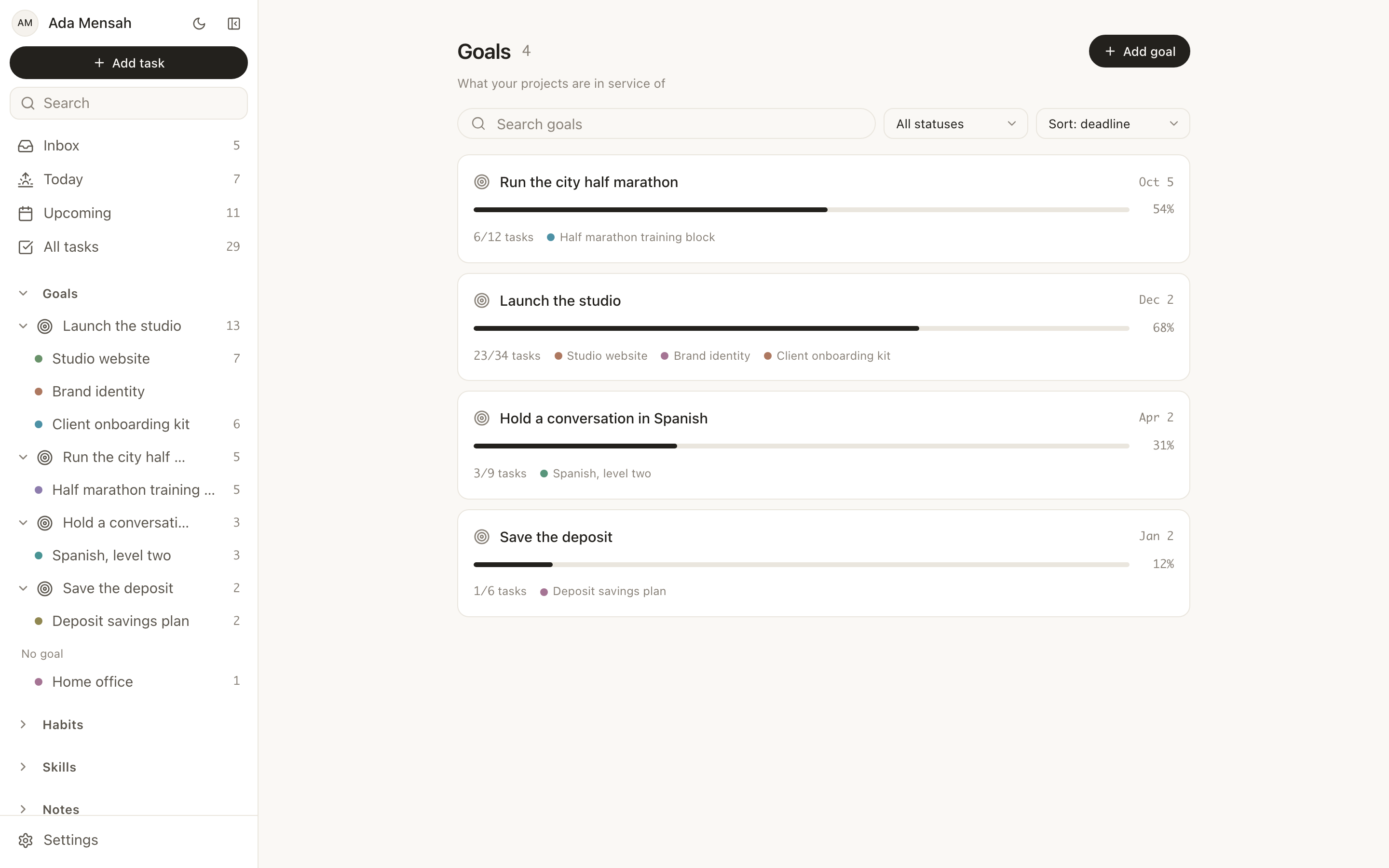
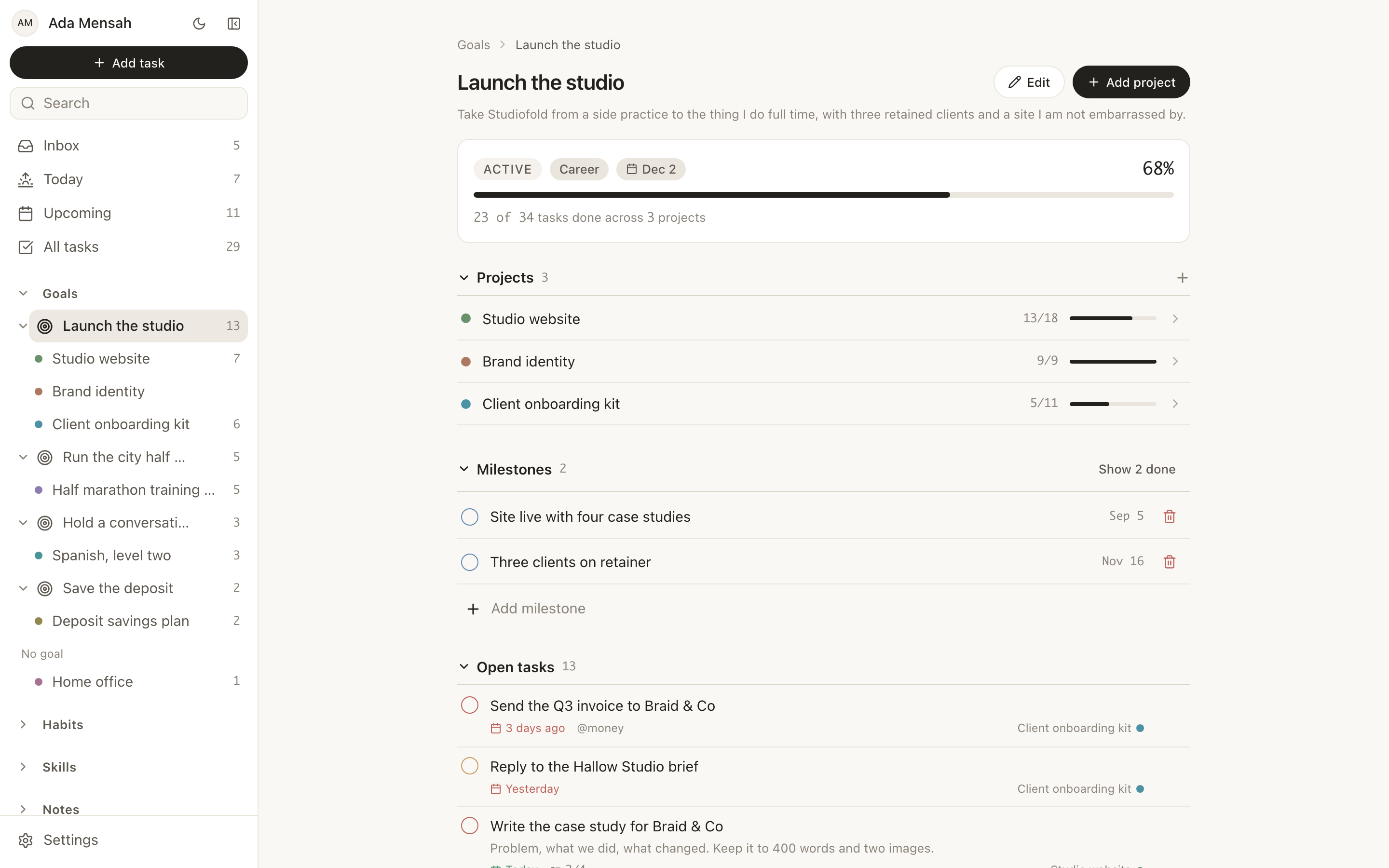
Open a goal and you get its milestones, the projects attached to it, and the open tasks it is waiting on. The sidebar carries the same structure as a goal to project tree with live counts, so the goal is present on every screen rather than filed away on a goals page.
Underneath the goals sit habits with daily or named-weekday schedules, a streak, a strength score derived from consistency and recency, and a year-long contribution graph. Skills track logged practice in minutes. Notes link to anything with [[Title]] wiki-links. The Today view puts overdue work at the top, then what is due, then the day's habits, then the calendar.
Limitations, plainly: no Kanban board, no Gantt chart, no Google Calendar or iCal sync, no importer from another app, and no integrations beyond the ChatGPT and Claude connector. If any of those is load-bearing for you, this is the wrong tool and no amount of goal modelling compensates.
Free plan: 2 active goals, 5 active projects, 20 open tasks, 5 habits and 5 skill tracks, plus a weekly summary. The limits count open items only, so finishing something returns the slot. Pro is $15 per month or $144 per year.
2. Notion, when you want to design the system yourself
Notion is the honest answer for people who enjoy building the thing as much as using it. Databases, relations and rollups can express a goal to project to task hierarchy properly, and a rollup can compute goal progress from child records rather than asking you to type it.
The cost is maintenance. Every schema decision, every broken formula and every "I will fix this view later" is yours. Plenty of people build an excellent goal system in Notion and then spend their goal-setting time on the system rather than the goals. If you have already built and abandoned 2 of them, that is information.
3. Todoist, when the goal was never the actual problem
Todoist is a very good task manager and a poor goal tracker, and for a lot of people the first half matters more. Natural language capture, recurring tasks, filters and mature cross-platform sync solve the problem of "too many things to do" better than any goal layer will.
Projects can stand in for goals loosely, but there is no goal record, no calculated progress toward one, and no habit tracking. If your difficulty is throughput rather than direction, adding a goal tracker will not help and may add a second thing to maintain. We wrote the longer version of this argument in alternatives to Todoist.
4. TickTick, when you want tasks plus habits in one place
TickTick is a task manager with a habit tracker attached, which covers 2 of the 4 criteria above. You get the daily mechanism and the daily visibility. What you do not get is a goal record with milestones or progress derived from the work, so the connection between "I meditated 40 days running" and "am I closer to the thing this was for" still lives in your head.
For many people that is enough. A streak plus a task list is already a functioning system, and it is a smaller change than moving everything.
5. Things 3, when you want the calmest possible surface
Things 3 is Apple-only, bought outright rather than subscribed to, and better designed than most software of any kind. Its Areas concept gives a shallow sense of long-range structure, and its Today view is unhurried in a way that matters if you find productivity apps stressful.
It is not a goal tracker and does not claim to be. No habits, no calculated progress, no milestones. Choose it because you want a task app that never nags you, not because you want to see how a 12-month goal is doing.
Test it in 10 minutes before you install anything
Switching apps is a bad way to find out whether an app suits you, because the first week is migration rather than use.
A cheaper test: take the one goal you would be annoyed to reach December without, and put it through the goal tracker. It asks for the measure, the deadline and where the goal honestly stands right now. If writing the measure is hard, the problem is the goal rather than the app, and no software fixes that. If it is easy and the answer is uncomfortable, you have found the thing a tracker is for.
2 narrower versions exist for the 2 spans that actually work: the 90-day goal tracker for one goal across 12 weeks, and the yearly goal tracker for a theme per quarter with a 12-month grid. None of them needs an account.
How to choose
Choose EvyOS if you want goals, projects, tasks, habits and skills in one system and you are currently maintaining 3 apps that do not know about each other. See goals in EvyOS and the pricing.
Choose Notion if you want to design the model yourself and you will enjoy the maintenance.
Choose Todoist if the real problem is volume of work, not direction.
Choose TickTick if you want the daily mechanism attached to the list with the smallest possible disruption.
Choose Things 3 if you are Apple-only and want the quietest app on this page.
Choose a spreadsheet if you have exactly 3 goals and check them monthly. That is not a joke answer: a spreadsheet with a date column beats an abandoned app, and plenty of people never need more.
Start on the EvyOS free plan — 2 active goals, 5 active projects, 20 open tasks, 5 habits and 5 skill tracks, counting open items only.
Frequently asked questions
What is the best goal tracker app for someone starting from nothing?
Start with one goal and one habit, whatever the app. The common failure is not a bad tool, it is 9 goals entered in one evening, of which 8 are dormant by February. For the free option specifically, see free goal tracking app.
Is a goal tracker different from a habit tracker?
Yes, and they need each other. A habit tracker records repeated behaviour and answers "did I do the thing today". A goal tracker holds the outcome, its deadline and its milestones, and answers "is the thing working". In EvyOS both exist as separate record types, and the habit sits underneath the goal it feeds.
Can a goal tracker app calculate progress on its own?
Only if it knows about the work. EvyOS calculates a goal's progress from the projects and tasks beneath it, so the number moves when you finish something and not when you feel optimistic. In Notion the same thing is achievable with rollups, provided you write them. In a task manager there is nothing to calculate from.
How many goals should I track at once?
Fewer than you want to. The free plan's limit of 2 active goals is low on purpose, and most people who hit it discover that the third goal was a wish rather than a commitment. If you genuinely need more, Pro removes the ceiling on projects, habits and skills.
Do goal tracker apps work for team or shared goals?
Sometimes. In EvyOS a shared workspace covers 5 people on Pro, then $3 per person per month, and only the subscriber pays. Goals, projects, tasks and habits created inside the workspace belong to everyone in it. Dedicated team tools do collaboration more thoroughly; this suits a couple or a founding pair rather than a 40-person department.
What is the difference between a goal tracker and a progress tracker app?
Mostly the name. A progress tracker app usually means one that shows how far along something is, and that is only honest if the number comes from somewhere. Test it before committing: create a goal, add 2 projects and 4 tasks under it, and complete one task. If the progress bar moves on its own, the app is tracking progress. If you have to edit a percentage, it is recording your opinion of your progress.
What should a goal tracker show me visually?
Less than you would expect, and it should be derived rather than drawn by hand. We went through the specific views that earn their place — contribution graphs, calculated progress bars, the goal tree — in visual goal tracker.