Todoist is a very good task manager. It captures a task faster than anything else in the category, it parses a date out of a typed sentence, its recurring rules hold up, its apps are mature on every platform, and its integration ecosystem is years ahead of most competitors. Any list of alternatives that opens by explaining what is wrong with it is not worth reading.
So here is the honest version. If your problem is that you have too many tasks and nowhere tidy to keep them, stay with Todoist. Nothing on this page will manage a task list better than Todoist manages a task list.
People look for alternatives when the problem has changed shape. Usually it looks like this: a task manager, plus a habit app, plus a spreadsheet of goals, plus a note somewhere explaining why the project exists — and none of the four know anything about the other three. Or the opposite: the work is a team's work now, and a personal task list was never going to hold it.
This guide covers 8 alternatives: personal task apps first, then the team tools. Every one of them is better than Todoist at something and worse at something else, and the sections say which.
The short answer
- You want the closest like-for-like swap, with habits added: TickTick.
- You want habits, goals and skills connected to your tasks, not beside them: EvyOS.
- You want something free that is already on your computer: Microsoft To Do.
- You want tasks and a calendar in one daily view: Any.do.
- You are on Apple hardware and want the calmest possible task app: Things 3.
- You are a developer tracking engineering work: Linear.
- You need a team to plan and report on projects: Asana.
- You want a small team's project work and its conversation in one place: Basecamp.
Quick comparison
| Tool | Built for | Habits | Skill practice | Goals above projects | Platforms |
|---|---|---|---|---|---|
| EvyOS | One personal system, not one list | Yes, with streaks and a year graph | Yes, logged in minutes | Yes, with calculated progress | Web, and installs on a phone from the browser |
| Things 3 | Apple-native task management | No | No | No | Apple platforms only |
| TickTick | Tasks with a habit tracker attached | Yes, basic | No | No | Cross-platform |
| Microsoft To Do | A free, simple list tied to Microsoft 365 | No | No | No | Cross-platform |
| Any.do | Tasks and calendar in one daily plan | No | No | No | Cross-platform |
| Linear | Engineering issue tracking | No | No | No | Web and desktop |
| Asana | Team project management | No | No | No | Web and mobile |
| Basecamp | Team project work and messaging | No | No | No | Web and mobile |
Pricing is deliberately not in that table. Every one of these tools changes its plans, and a stale number in a comparison is worse than no number. Check each vendor's own pricing page. The only prices stated on this page are our own, because those we can be held to.
1. EvyOS, when tasks were never the whole problem
Best for: one person who is running a task manager, a habit tracker and a goals document at the same time and would like them to be one thing.
EvyOS is not a task manager with features bolted on the side. It holds 7 linked record types — goals, projects, tasks, habits, skills, notes and calendar events — and a task is one of them rather than the point of the whole product.
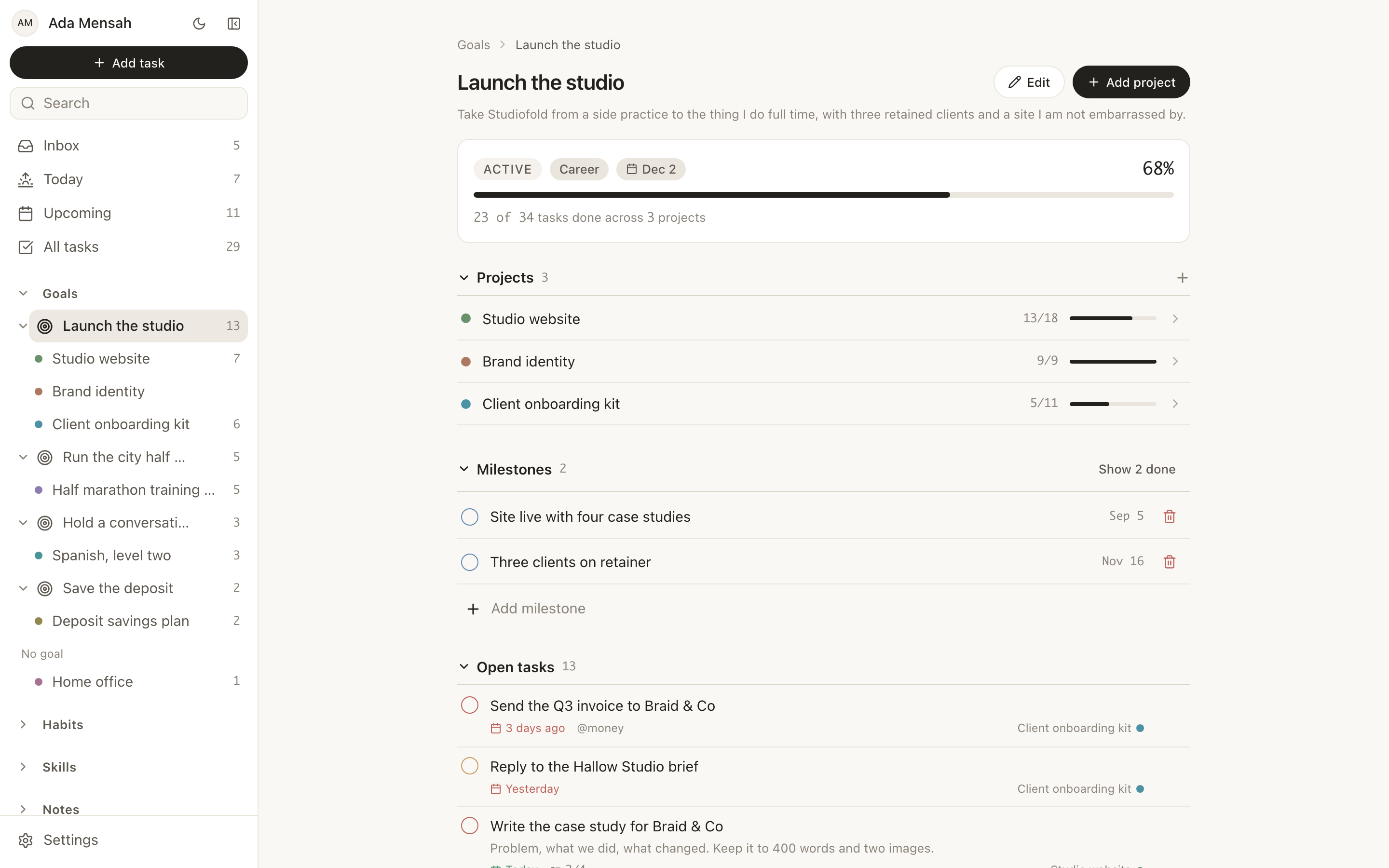
The structural difference is the ladder. A task can sit under a project, a project can sit under a goal, and a goal's progress is calculated from the work underneath it rather than typed in by you. A goal cannot claim to be 80 per cent done while nothing beneath it has moved. That is the thing a task list genuinely cannot do, no matter how well you name your projects.
The daily view is shaped much the way a Todoist user expects. Today puts overdue work at the top on its own, then what is due, then the habits scheduled for the day, then the calendar.
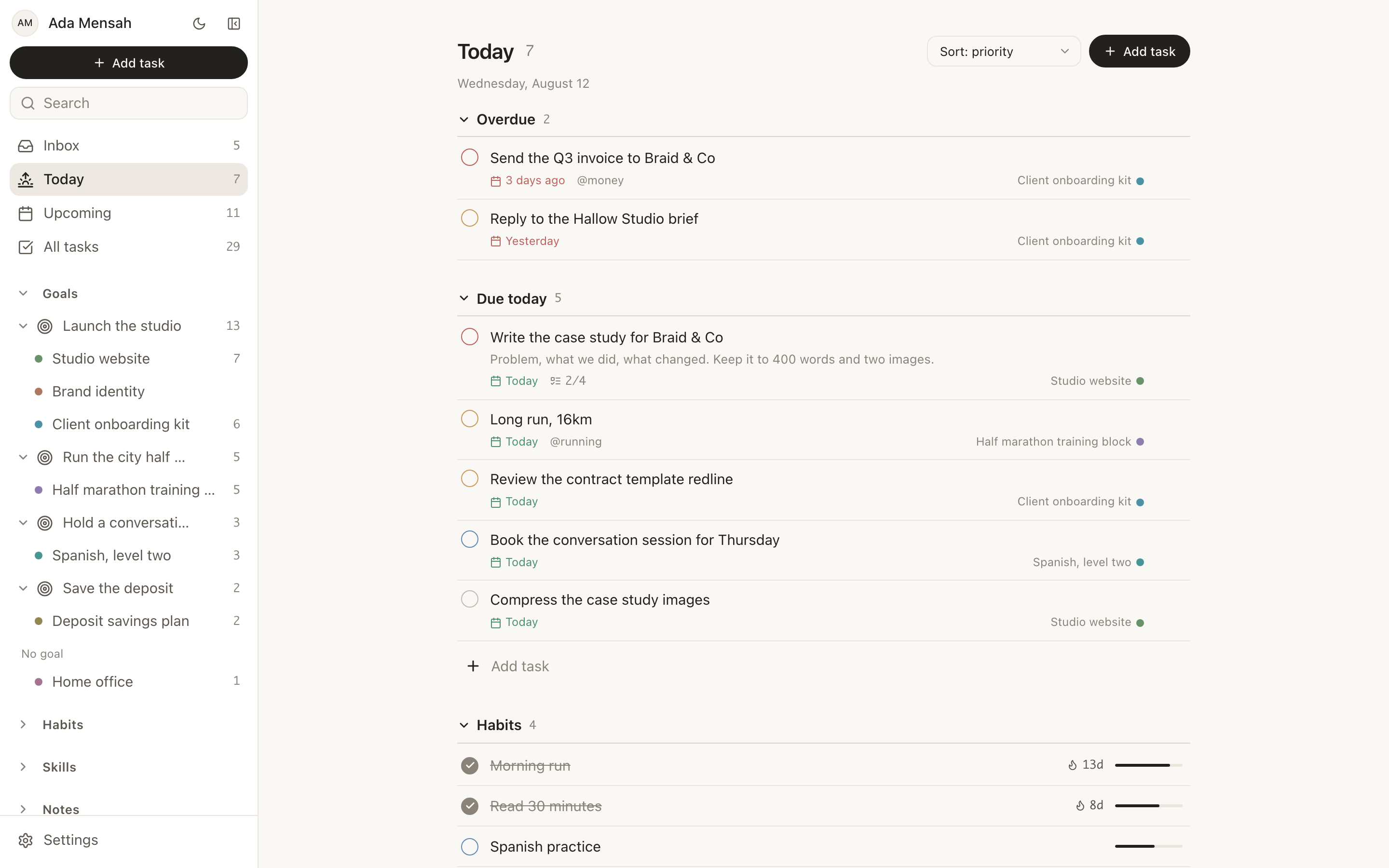
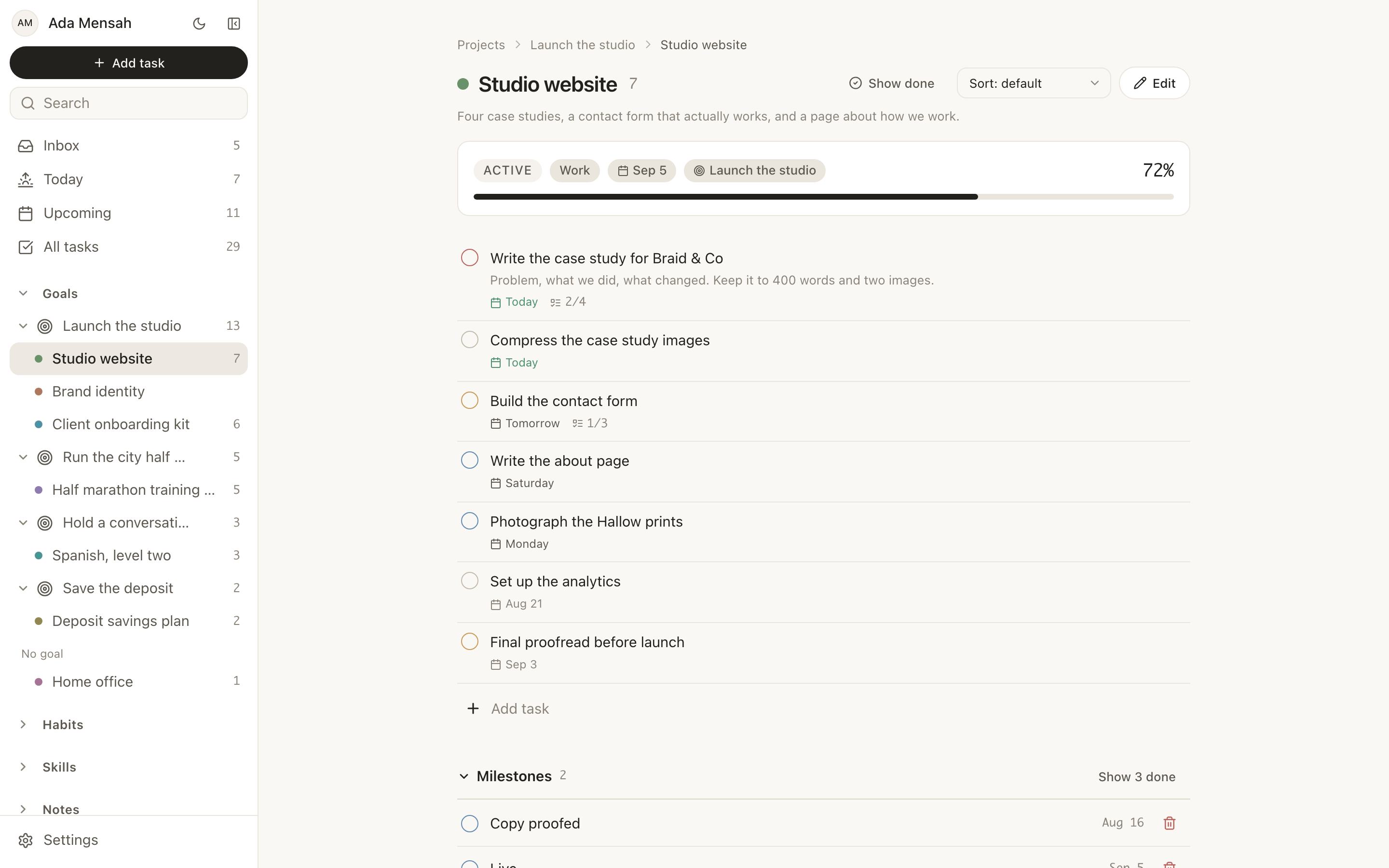
Projects are records rather than folders. A project has a deadline, milestones and an optional parent goal, which means a project can be visibly behind — a state a list of tasks has no way to express.
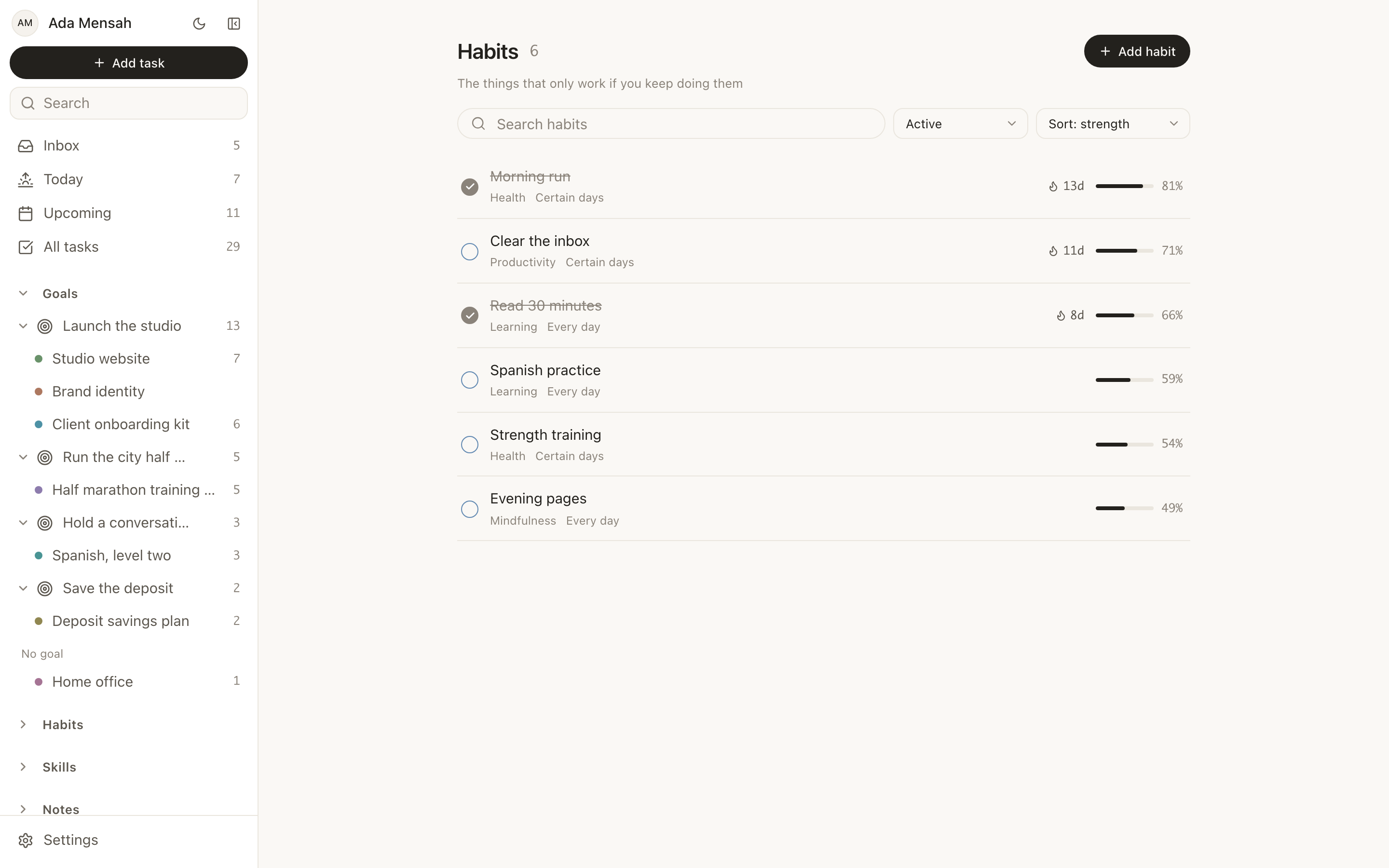
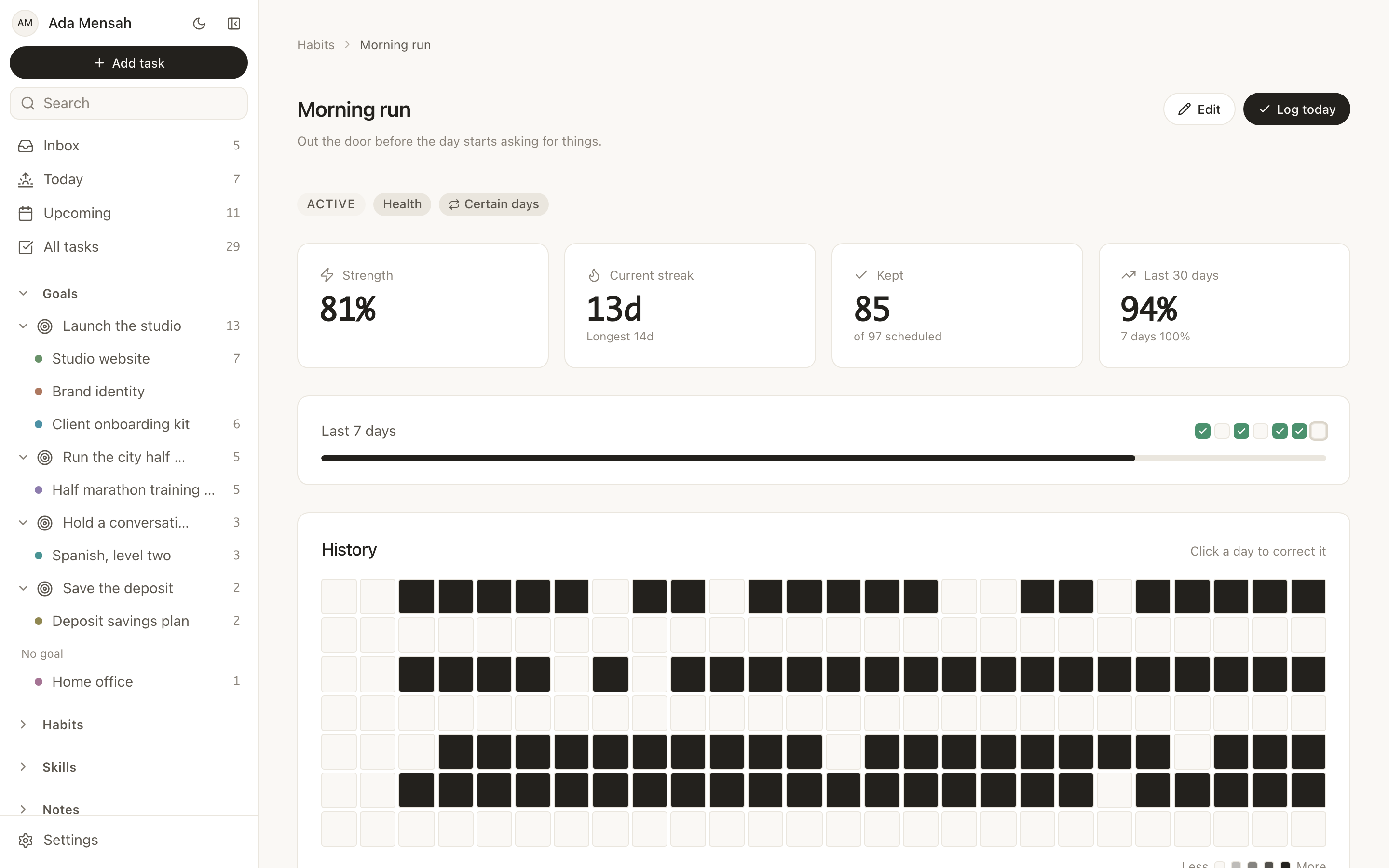
Habits are their own record type, not tasks that repeat. A habit has a daily or named-weekday schedule, a streak, a strength score computed from consistency and recency, and a year-long contribution graph. The distinction matters more than it sounds: a recurring task that you skip becomes an overdue task nagging at you, while a missed habit day is simply a gap in a graph you are trying to keep dense.
Skills are the fourth record type and the one with no equivalent anywhere else on this list. A skill has a current level, a target level and a log of practice sessions in minutes with an activity type, so the hour you spent on Spanish accumulates against something instead of disappearing into a completed task.
There is also a connection graph that links any record to any other with a typed relationship, markdown notes with folders, tags, version history, [[Title]] wiki-links and backlinks, and — on every plan — a connector that lets ChatGPT or Claude read and change your records over MCP.
EvyOS vs Todoist, capability by capability
| Capability | Todoist | EvyOS |
|---|---|---|
| Typed capture with a date in the sentence | Natural language parsing, best in category | None. Inline composer and forms |
| Task detail | Priorities, due dates, subtasks, comments, labels, recurrence | 4 priority levels, due date, estimated and actual minutes, subtasks, comments, attachments, tags, recurrence |
| Unsorted capture | Inbox | Unsorted inbox for any task with no project |
| Projects | A container for tasks | A record with milestones, a deadline and an optional parent goal |
| Goals above projects | Not a record type | Goals with milestones, a target date, and progress calculated from the work underneath |
| Habits | Recurring tasks | A separate record: daily or named-weekday schedule, streak, strength score, year-long contribution graph |
| Skill practice | Not a record type | Skills with a level, a target level and sessions logged in minutes with an activity type |
| Notes | Task descriptions and comments | Markdown notes with folders, tags, search, version history, [[Title]] wiki-links, backlinks, public share links |
| Linking unlike things together | Labels and subtasks | A connection graph joining any record to any other with a typed relationship |
| Calendar | Integrates with your external calendar | Built-in events only. No Google Calendar or iCal sync |
| Integrations | Large, mature ecosystem | None, apart from the ChatGPT and Claude connector, on every plan |
| Boards | Board view | No Kanban board. Lists only |
| Offline use | Yes | No offline mode |
| Migrating in | — | No Todoist importer |
| Sharing | Shared projects | Shared workspaces on Pro: 5 people, then $3 per person per month, subscriber pays |
| AI clients | — | Connect ChatGPT or Claude over MCP with one URL, on every plan |
Half of that table is a point against us, which is the useful half. Read the right-hand column for what you would gain and the middle column for what you would give up, and weigh them against your own week rather than the article's.
What Todoist still does better, and it is not close:
- Capture speed. Typing a task, its date and its time in one line is the fastest entry anywhere.
- Natural language parsing. EvyOS does not read dates out of a sentence at all. Entry is form-based: an inline composer at the top of any list for fast repeat entry, a command palette for jumping around, and a full form when a task needs a project, an estimate or subtasks.
- Integrations. EvyOS has effectively none — no Slack, no Zapier, no IFTTT, no email-to-task, no plugins, and no Google Calendar or iCal sync.
- Maturity, offline use and platform coverage. Todoist has been refined for over a decade.
There is also no Todoist importer. Most people who move start with what is actually live — the 2 or 3 goals that matter this quarter, the projects under them, the tasks open right now — which is usually 20 to 40 items rather than the several hundred a full export would drag across.
Pricing: the free plan is 2 active goals, 5 active projects, 20 open tasks, 5 habits and 5 skill tracks, plus a weekly summary. The limits count only open items, so finishing something frees the slot rather than pushing you toward an upgrade. Pro is $15 a month or $144 a year, removes the limits and adds shared workspaces. A shared workspace covers 5 people, then $3 per person per month, and only the subscriber ever pays. The full breakdown is on pricing.
Read next: tasks in EvyOS, projects and milestones, and the shorter product-focused answer at Todoist alternative. This page is the survey; that one is the case for a single tool.
2. Things 3, for Apple users who want the calmest task app
Best for: people who live entirely on Apple hardware and want task management that feels quiet.
Things 3 is widely regarded as the best-designed task manager available. Areas and projects give a sensible structure, headings inside a project group work naturally, and the whole app is unhurried in a way that makes a long list feel less like an accusation. It is sold as a one-time purchase per platform rather than a subscription, which some people strongly prefer.
Strengths: design and interaction quality; deep Apple integration including Siri, Apple Watch and widgets; a purchase model with no recurring bill.
Limitations: Apple platforms only, so no Android, no Windows and no web app; no habit tracking; no skill or practice tracking; no goal layer above projects; no collaboration; sync happens through the vendor's own service rather than any third-party option.
Who should switch: Apple-only users whose complaint about Todoist is that it feels busy rather than that it is missing a capability.
3. TickTick, for tasks with a habit tracker attached
Best for: people whose single complaint about Todoist is the absence of habits.
TickTick is the closest direct competitor to Todoist that also ships a habit tracker. Tasks, calendar, a Pomodoro timer and habits sit in one app, and the task management itself will feel familiar within an hour. If the reason you are reading this page is that you have a habit app open in a second tab, TickTick solves that with the smallest change to your existing workflow of anything here.
Strengths: task management close enough to Todoist's to switch without relearning; a built-in habit tracker with streaks; a Pomodoro timer wired into the task flow; a calendar view; genuinely cross-platform.
Limitations: habit tracking is deliberately simple, so there is no practice logging or strength scoring; no skill development tracking; no goal layer that projects and tasks roll up into; the interface is functional rather than refined.
Who should switch: Todoist users who want habits added and nothing else changed.
4. Microsoft To Do, when free and simple is the whole brief
Best for: people who used Todoist as a plain list and do not want to pay for one.
Microsoft To Do is free, runs on every major platform, and is built into Microsoft 365: tasks flagged in Outlook show up in it, and it can sit alongside Outlook and Teams. The My Day view is a deliberately short list for today, which you rebuild each morning from everything else. That is a small ritual, and it suits people who find a permanently full Today view discouraging.
Strengths: free, with no plan to outgrow; tight integration with Outlook and Microsoft 365; shared lists for a household or a colleague; a clean, unfussy interface.
Limitations: no habits, goals or skill tracking; natural language parsing is less capable than Todoist's; projects are just lists, so there is nothing to track a deadline or milestones against; little to extend if your needs grow.
Who should switch: anyone paying for Todoist but only using its lists, especially if the day already runs through Outlook.
5. Any.do, when your tasks and your calendar should be one view
Best for: people who plan the day around a calendar and want tasks in the same place.
Any.do puts tasks and calendar events together in one daily plan, with a morning prompt to go through what is due. It also covers the household side of planning, with shared lists and a family plan, which is where a lot of people's to-do lists actually live.
Strengths: tasks and calendar in one view; a daily planning prompt; shared and family lists; available on all major platforms.
Limitations: no habit tracking, skill tracking or goal layer; less depth in projects than Todoist; the most useful features, including the full calendar integration, are on the paid plans.
Who should switch: Todoist users whose real problem is that the calendar and the task list never agree about what today holds.
6. Linear, for engineering work
Best for: software developers and engineering teams tracking issues.
Linear is not a personal productivity tool and does not try to be. It is an issue tracker built around how software teams actually work — cycles, backlogs, triage — and it is extremely fast. If you have been using Todoist as an engineering backlog, you have been using the wrong shape of tool.
Strengths: speed and a keyboard-driven interface; a workflow model built for software delivery; GitHub and GitLab integration; strong team features.
Limitations: only suitable for engineering work; no habits, skills or personal goals; heavier than a solo task list needs to be; oriented around teams rather than individuals.
Who should switch: developers using Todoist for work tracking who would be better served by something purpose-built.
7. Asana, for teams that need to plan and report
Best for: teams that need assignments, timelines, dependencies and reporting.
Asana is a team project management tool. If you have been running a team out of shared Todoist projects and hitting the ceiling at the point where somebody asks for a timeline or a status roll-up, Asana is the category of tool that answers that question.
Strengths: multiple project views including list, board, timeline and calendar; task dependencies and milestones; assignments, comments and status updates; portfolio and reporting views for managers; a wide integration set.
Limitations: built for teams, so it is heavy for one person; no habit tracking; no skill or practice tracking; enough configuration surface that somebody has to own it.
Who should switch: people using Todoist for team collaboration who have outgrown a shared list.
8. Basecamp, for a small team's work and its conversation
Best for: small teams that want project work and team messaging to live in one place.
Basecamp is opinionated about doing less. It combines project management with messaging, file sharing and scheduling, and it deliberately offers fewer knobs than its competitors. Hill Charts give a project a visual sense of "have we figured this out yet" that a percentage-complete bar never does.
Strengths: a simple, opinionated interface that resists feature creep; built-in messaging, which removes one tool from the stack; Hill Charts; automatic check-ins that replace some status meetings.
Limitations: no personal productivity features at all; no habit or skill tracking; task management is thinner than a dedicated task app; not designed for solo use; a smaller integration set than its competitors.
Who should switch: small teams running Todoist next to a chat tool who would rather run one thing.
Try the idea before you move anything
Switching tools is a bad way to find out whether a tool suits you, because the first week is all migration and none of it is the actual experience.
A cheaper test: take one real goal — the one you would be annoyed to reach December without — and put it through the goal tracker. It asks for the measure, the date and where the goal actually stands right now, and it hands back the shape a goal needs to survive contact with February. If filling it in makes you think "this is the layer my task list has been missing", that is the signal. If it makes you think "my task list already covers this", you have your answer too, and it cost you 5 minutes.
How to choose
Choose EvyOS if you want goals, projects, tasks, habits and skills in one system and you are currently paying the tax of three apps that do not talk to each other. Accept the trade: no natural language parsing, no importer, no integrations.
Choose Things 3 if you are Apple-only, want the calmest task app made, and prefer buying software outright.
Choose TickTick if you want Todoist plus habits and the smallest possible disruption.
Choose Microsoft To Do if you want a free list and your day already runs through Outlook.
Choose Any.do if you want tasks and your calendar in the same daily plan.
Choose Linear if you are tracking engineering work.
Choose Asana if you need team project management with reporting.
Choose Basecamp if you want a small team's projects and conversation in one place.
Stay with Todoist if tasks are the whole problem. That is not a consolation prize. Most people who churn through five productivity apps in a year did not have a tooling problem in the first place.
Start on the EvyOS free plan — 2 active goals, 5 active projects, 20 open tasks, 5 habits and 5 skill tracks, counting open items only, with no card required.
Frequently asked questions
Is there anything better than Todoist?
For managing a task list, rarely. Todoist is faster to capture into and more mature than almost everything else. Other apps are better at something next to the task list. TickTick adds habits, Any.do adds the calendar, Things 3 is calmer on Apple devices, and EvyOS connects tasks to goals, habits and skills. Decide which of those you are missing before you switch.
Which is better, TickTick or Todoist?
Todoist has the better natural language parsing, more integrations and a cleaner interface. TickTick adds a habit tracker, a Pomodoro timer and a calendar view in one app. Choose TickTick if you want habits and a timer without a second app. Choose Todoist if fast capture and integrations matter more. Neither connects habits to goals, which is the gap EvyOS is built around.
Is Things 3 better than Todoist?
On Apple devices, many people find it more pleasant to use, and you pay once instead of subscribing. It is not better if you use Windows, Android or a browser at work, since it runs only on Apple platforms, or if you share projects with anyone.
Is Notion or Todoist better?
They do different jobs. Todoist is a task manager: fast capture, dates and recurring tasks. Notion is a blank workspace where you build your own system from pages and databases. People who try to run their tasks in Notion usually end up maintaining the system instead of doing the tasks. For the Notion side of that question, see apps like Notion.
What is the best free Todoist alternative?
It depends on whether "free" means "free forever with limits" or "free trial". The EvyOS free plan is permanent: 2 active goals, 5 active projects, 20 open tasks, 5 habits and 5 skill tracks, plus a weekly summary, with no card. The limits count only open items, so completing a task or archiving a finished project returns the slot — the plan is a cap on how much is in flight, not on how much you can ever do. TickTick and Asana also have free tiers; check their own pricing pages for what those currently include.
What is the best Todoist alternative with habit tracking?
TickTick if you want habits bolted onto a Todoist-shaped task app with minimal change. EvyOS if you want habits as a first-class record: a daily or named-weekday schedule, a streak, a strength score derived from consistency and recency, and a year-long contribution graph, sitting next to the goals and projects the habits are actually in service of. Todoist itself has no built-in habits; does Todoist have a habit tracker? covers its Habit Tracker extension and the rule that resets a streak whenever a task is rescheduled.
Is there an app like Todoist that also tracks goals?
This is the gap most task managers leave, because a goal is not a task and modelling it as one produces a checkbox you will never tick. In EvyOS a goal is its own record with milestones and a target date, and its progress is calculated from the projects and tasks underneath it. You cannot fake it, which is the point.
Can I import my Todoist data?
Into EvyOS, no — there is no Todoist importer, and saying otherwise would cost you an afternoon. The approach that works is to bring across only what is live: this quarter's goals, the projects under them and the tasks that are genuinely open. Leave the archive in Todoist and stop adding to it. Other tools on this list vary; check each vendor's own migration documentation rather than trusting a comparison article about it.
Does any of these parse natural language the way Todoist does?
Todoist's parser is the best in the category and it is the first thing people test when they try something else. TickTick has parsing of a similar kind. EvyOS has none — typing "call Sarah Tuesday at 2pm" will not fill in a date. Entry is form-based, with an inline composer at the top of every list for fast repeat entry and a command palette for navigation. It is a real loss, and if fast typed capture is the reason you open Todoist every morning, that alone is a good reason to stay.
Can I share a project with someone, the way Todoist shares projects?
In EvyOS, yes, through a shared workspace: goals, projects, tasks and habits created inside it belong to everyone in the space, tasks can be assigned to a member, and a shared habit keeps a separate streak per person. Pro covers 5 people in a workspace, then $3 per person per month, and only the person who created the workspace pays — the other members do not need their own subscription. Asana, Basecamp and Linear are all built team-first and will do collaboration more thoroughly.
Should I actually switch from Todoist?
Probably not, if your list is the only thing you are managing. Todoist is faster to capture into, more mature, better connected to other software and available in more places. The case for moving appears when you notice you are maintaining a habit tracker in a second app, a goals list in a spreadsheet and a note somewhere explaining what the project is for — and none of them know the others exist. That is a different problem, and it needs a different shape of tool. If you want the single-product version of that argument rather than this survey, read Todoist alternative or the head-to-head at EvyOS vs. Todoist.