Search for a productivity system for ADHD and you get two kinds of answer. One is a method with a name and a diagram, which assumes you will do the same seven steps every Sunday. The other is a list of apps with feature tables, which assumes the difference between them is the feature count.
Neither is much use, because for a lot of people the difficulty is not the work and not the app. It is the distance between opening a tool and knowing what to do next. Every step in that gap — remembering which app it is in, scrolling a list of 40 things, weighing them against each other, deciding — costs something, and when the total cost is high enough you close the app and do something else.
So this is not a method. It is a way of judging whether a to-do list app reduces that distance or adds to it, and a short setup you can finish in one sitting.
The system leaks in the gaps, not in the work
A system with four apps in it has four places to look and four chances to look in the wrong one. The item you cannot find is functionally deleted, whatever the folder structure says.
Many people describe the same shape of week. Monday is good, because Monday is when the system was rebuilt. By Thursday the list has grown past the point where scanning it is free, and the plan for the week lives partly in the app, partly in a note, and partly in your memory of Monday. By the following Tuesday, starting a new system feels less effortful than repairing the old one, which is why the fourth app of the year gets downloaded.
The fix is not more discipline applied to the same shape. It is choosing a shape with fewer gaps in it.
A checklist for an ADHD to-do list app
Feature tables are not much help here, because the useful properties are rarely listed as features. These are the ones worth testing in the first 10 minutes of a trial.
| What to test | Why it matters | Failure sign |
|---|---|---|
| What is on screen when the app opens | This is the decision the app makes for you | A blank page, or every task you own |
| Cost of capturing one item | Capture only survives if it is free | You must pick a project before you can type |
| Whether overdue is separated | Overdue mixed into today is a list you stop reading | One flat list sorted by date |
| Whether a missed day is recoverable | A record that resets teaches you to stop looking | A streak counter and nothing else |
| Where the plan lives when you are away | You should return to a plan, not rebuild one | The plan only exists as a list of tasks |
| Number of places to check | Every extra place is a chance to miss something | Habits here, tasks there, notes elsewhere |
Notice that most of those are about what the app does when you are not at your best. An app is easy to evaluate on a good day. The question is what it looks like on the day you open it after ignoring it for a week.
One screen, not one long list
A long list is worse than a short one by more than the difference in length, because a list is not read, it is weighed. Forty items with no dates and no priority means forty comparisons before the first action, and the comparisons are the expensive part.
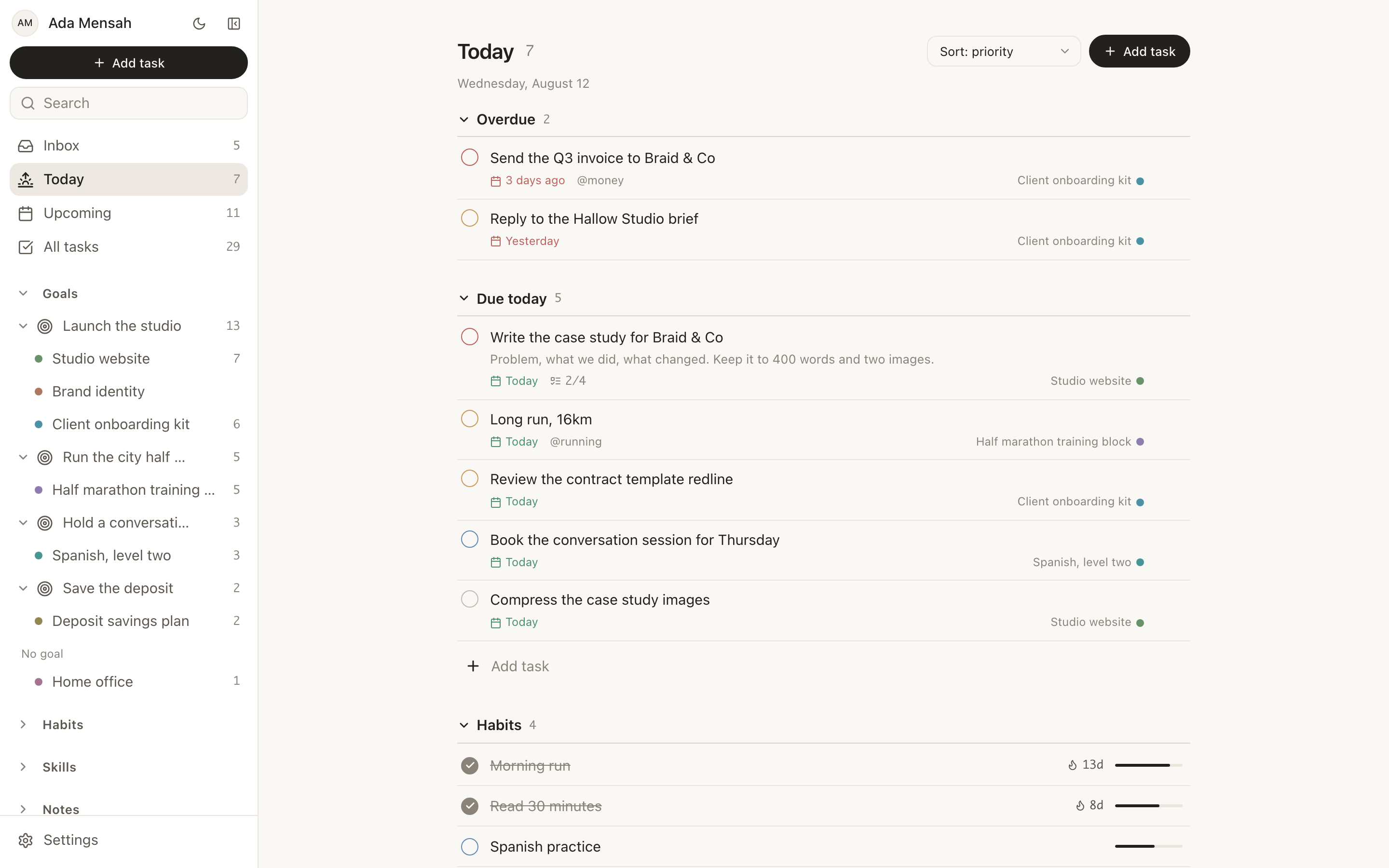
What helps is a screen that has already made most of those decisions. In EvyOS, Today shows overdue work split out at the top, then what is actually due today, then the habits scheduled for the day, then the calendar. There is no view to configure and no filter to apply first. Priority rings and date chips carry the sorting so you do not have to hold it.
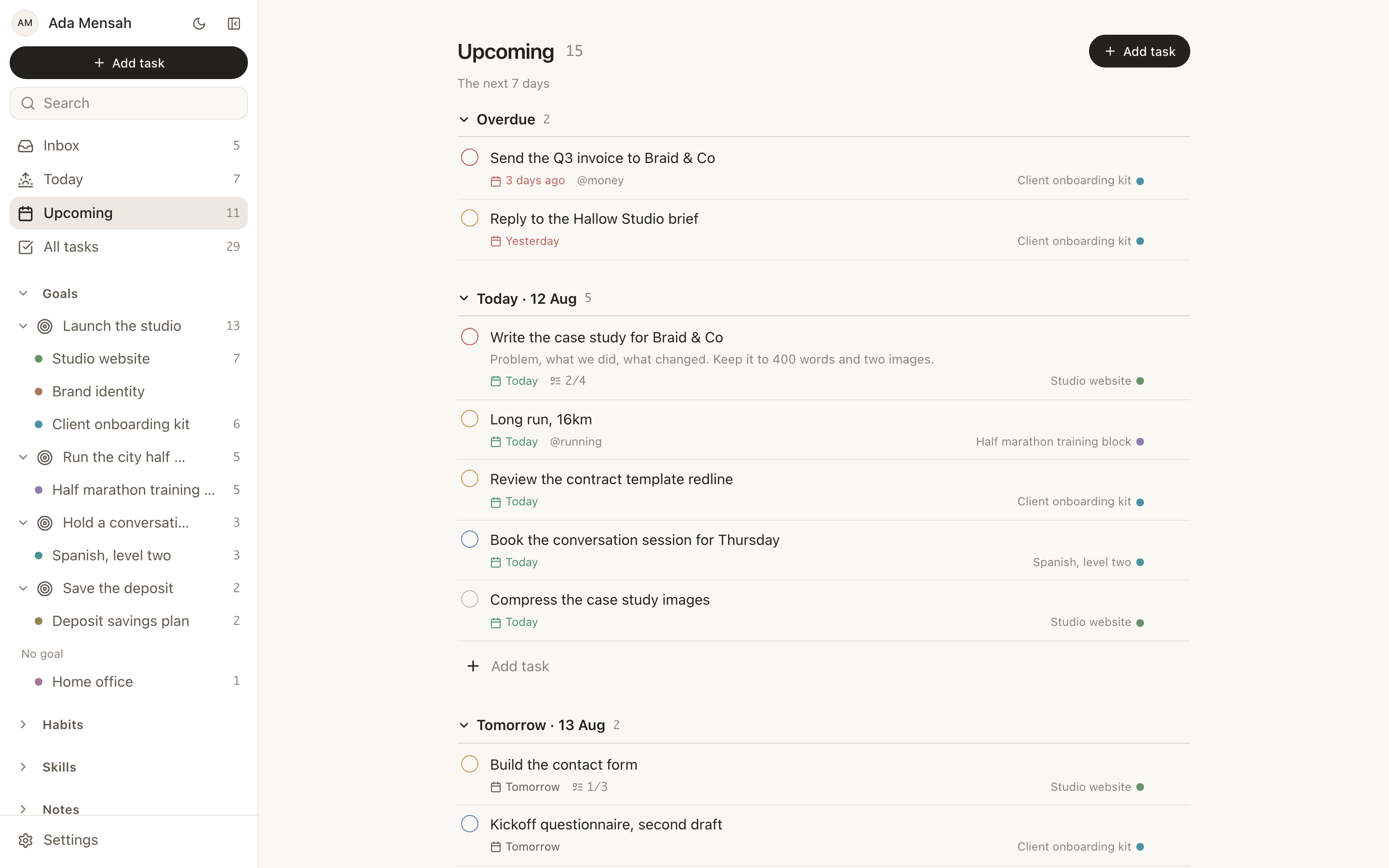
The counterpart is Upcoming, which shows the next 7 to 14 days with one section per day. It exists for a specific moment: the point where you are about to agree to something on Thursday without knowing what Thursday already holds.
Two smaller details do more work than they look like they should. Task detail opens as a slide-in panel rather than a new page, so working down a batch never loses your scroll position and never costs you the thread. And every list has an inline "+ Add task" composer at the top, so a thought that arrives mid-task can be written down without navigating anywhere.
Let the structure hold the plan
Capture without structure produces an inbox that becomes its own source of dread. Structure that requires maintenance produces an elaborate setup you abandon in week 3. The middle is a shallow hierarchy you can rebuild from in 5 minutes.
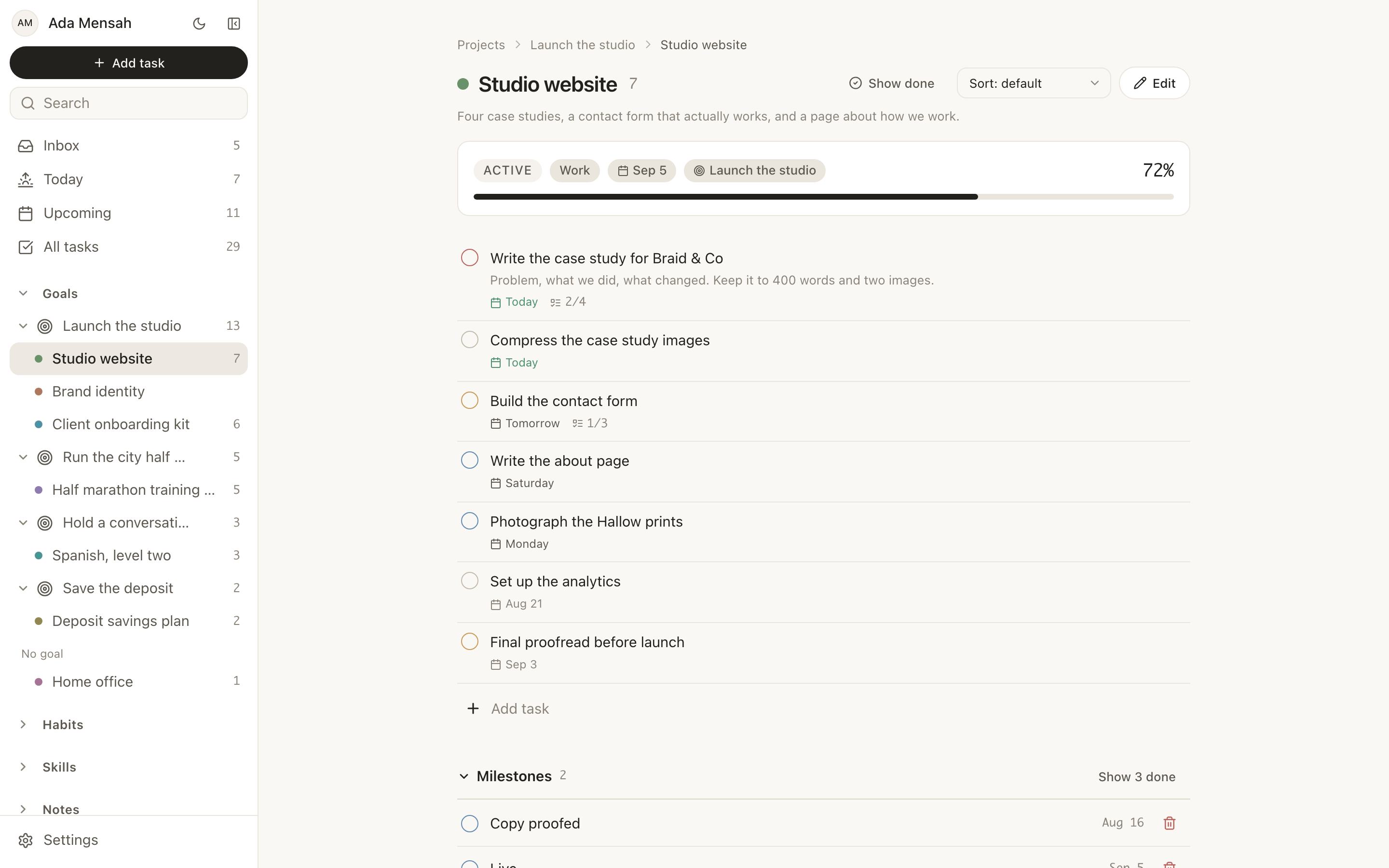
In EvyOS that ladder is goals above projects above tasks. A goal has a target date and milestones, and its progress is calculated from the work underneath rather than typed in. A project has its own milestones and deadline and an optional parent goal. A task with no project falls into an unsorted inbox instead of nowhere.
The point of the ladder is not tidiness. It is that when you come back after 2 weeks away, the plan is still written down at the level above the tasks. You are picking something up rather than reconstructing it from a list of fragments.
Design for the return
Every system will be dropped. The useful question is what happens next.
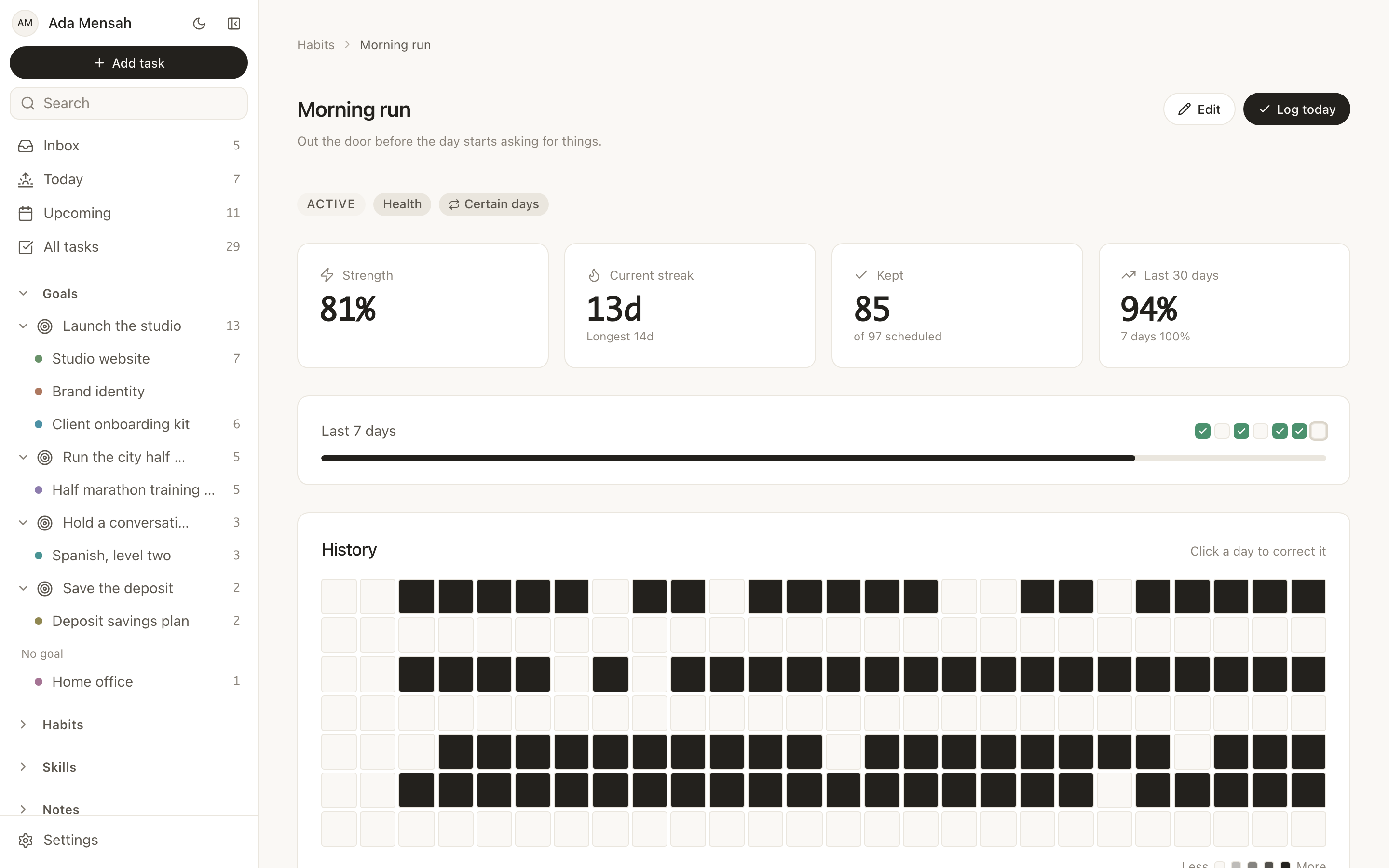
This is where streak counters do the most damage. A counter that resets to zero after one missed day turns the record of 3 good weeks into a 0, and the app becomes uncomfortable to open. Habits in EvyOS run on a daily or named-weekday schedule and show a streak, but also a strength score built from consistency and recency, and a year-long contribution graph. Four days out of 7 looks like 4 days out of 7 rather than a failure, which is the difference between a record you check and one you avoid.
There is a related version of this for interests. When something grabs your attention and you spend 6 hours on it, that time usually leaves no trace. Skills record it as sessions logged in minutes against a current level and a target level, so a burst of enthusiasm accumulates into something visible instead of evaporating when attention moves on.
We have written about both of these in more depth: why habit trackers fail ADHD brains covers the streak problem and what to measure instead, and ADHD task management that actually works is a set of working rules for the daily list.
A 20-minute setup
- Empty your head into the inbox. No sorting, no projects, no dates. One sitting, everything you are carrying. The point is to stop holding it, not to organise it.
- Pick the 5 that matter this week. Give those a due date. Leave the rest in the inbox, where they are safe and out of the way.
- Make one project. Whatever is currently taking up the most background thinking. Put its next 5 tasks under it and write the deadline down.
- Add 2 habits, not 6. Six is the number that feels right on setup day and is unmanageable by day 4.
- Stop there. Open Today tomorrow morning and do what is on it. Add structure in week 2, when you can see what is missing rather than guessing.
If a plain list is what you want, none of the rest is required. The ladder is there for the weeks when a list is not enough.
What it costs
The free plan covers all of the above: 2 active goals, 5 active projects, 20 open tasks, 5 habits and 5 skill tracks, plus a weekly summary, with no card required. The limits count open items only, so finishing a task or closing a project gives the slot back rather than pushing you toward an upgrade for tidying up.
Pro, on pricing, is $15 per month or $144 per year. It removes the caps on goals, projects, tasks, habits and skills, and adds shared workspaces. The connector that lets ChatGPT or Claude read and change your records directly is on the free plan too. A shared workspace covers 5 people, then $3 per person per month, and only the subscriber pays.
The longer version of the argument is on the ADHD page, and if you want the general-purpose companion to this article, how to choose a personal productivity system covers the same ground without the friction focus.
Start a free EvyOS account and do the 20-minute setup. If it is still open in 2 weeks, it is working.
Frequently asked questions
What is the best productivity system for ADHD?
The one with the fewest steps between opening it and starting work. In practice that means a single place rather than four, a screen that decides the day for you instead of presenting everything at once, and a record of progress that survives a missed day. Whether it has a name matters much less than whether you can pick it up again after a week away.
Is there a free ADHD to-do list app?
Several apps have permanent free tiers, and it is worth trying more than one, since the fit is personal. EvyOS is free for 2 active goals, 5 active projects, 20 open tasks, 5 habits and 5 skill tracks with no time limit and no card. Because the limits count only open items, finishing things keeps you inside them.
Why do I abandon every productivity app after a few weeks?
Usually the app asked for maintenance it never repaid. Elaborate setups, tagging schemes and multi-step reviews all work while the novelty lasts and then stop. A setup you can rebuild in 5 minutes is more durable than one you spent a weekend on, because rebuilding it is not a project in itself.
Is EvyOS designed for ADHD?
No. EvyOS is a general productivity app, not a medical device, and there is no ADHD-specific mode in it. The argument on this page is narrower: the ordinary features — one screen for the day, capture with no decisions, structure that holds the plan, a record that does not reset — happen to remove friction that many people say gets in their way. Use it alongside whatever else works for you.
Should I use paper or an app?
Plenty of people use both, and the split that tends to hold is paper for today's page and an app for everything longer than a day. The arrangement that causes trouble is keeping the same information in both, because then neither one is trustworthy and checking becomes twice the work. The best planner for ADHD adults goes through the trade-offs properly.
How do I stop the list from growing until I ignore it?
Separate what is captured from what is scheduled. Everything can go in the inbox, but only a handful of items should carry a due date at any time, and Today should only ever show what is due. A capture list is allowed to be long. The list you look at each morning is not.