Most advice about the best productivity system is really advice about one method, written by someone for whom that method worked. That explains why the fourth attempt tends to fail the same way as the first three. The method was never the problem. A named method covers one part of the work and stays silent about the rest, and the silent parts are where a system quietly stops running.
A personal productivity system is the full set of answers to a small number of recurring questions: what do I do now, what is coming, what is this in service of, and how do I know any of it is working. A method answers some of those. A system has to answer all of them, and it has to keep answering them on a week when you are ill, travelling, or three days behind.
This is a guide to assembling one, rather than adopting one.
The three horizons a system has to cover
Almost every failure of a personal productivity system comes from a mismatch of horizon. You are using a tool built for one span of time to answer a question that belongs to another.
Today. One screen, decided in advance, that you can open and act on without triage. If deciding what to do costs more than the first task, the day is already going badly.
This week and next. Enough visibility to see the collision coming. Not a plan of every hour, but the knowledge that Thursday has three deadlines on it while you are still saying yes to things.
This quarter. The reason any of it is happening. Without this horizon, a system becomes very good at closing tasks that were not worth opening.
Write your setup against those three rows and the gap is usually obvious in a minute. Most people have a strong "today" tool, a vague sense of "this week", and nothing for "this quarter" except an intention they restate every January.
What the named methods actually cover
The well-known systems are not competitors. They cover different rows.
| Method | Strongest at | Leaves open |
|---|---|---|
| Getting Things Done | Capture, and getting commitments out of your head reliably | Which of the next actions matters this quarter |
| PARA | Filing reference material so it can be found again | The daily decision about what to do |
| Bullet journalling | A deliberate daily page, and migration as a filter | Anything that has to be shared, searched, or counted over months |
| Time blocking | Protecting hours for work that needs continuity | What happens when the block is missed |
| Eat the frog | Ordering the day around one hard thing | The other 6 hours |
| Weekly review | Catching drift before it compounds | Nothing, but it only works on top of something else |
Read down that right-hand column and the assembly job becomes clear. Capture from GTD, a filing scheme you can live with, a daily page that is short enough to finish, a weekly review that is boring by design, and something above all of it holding the quarter.
If you want the underlying argument about what separates a system from a pile of apps, what is a productivity system covers it directly, and how to build a personal operating system walks the layers in more depth.
The part almost everyone skips
The quarter. It gets skipped because most tools have nowhere to put it. A task manager offers a list, so the quarter becomes a list, and a list of outcomes is indistinguishable from a list of chores by the second week.
The test is simple. Pick something you want to be true in 3 months, then find the place in your setup where its progress is visible without you writing a status update. If that place does not exist, you do not have a quarter, you have a hope.
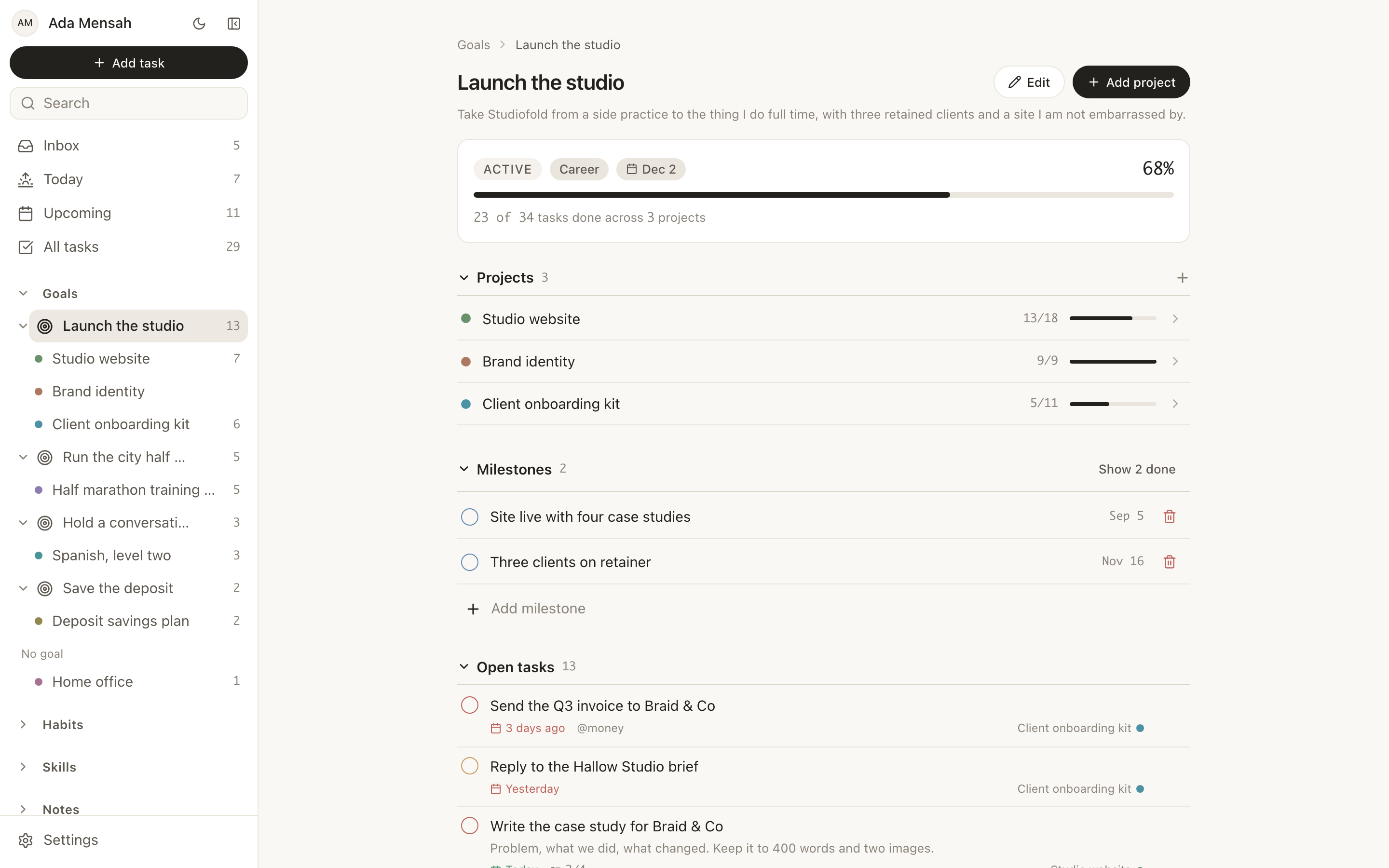
In EvyOS this is what goals are for. A goal is its own record with a category, a priority, a target date and milestones, and its progress is calculated from the projects and tasks underneath it rather than typed in. That constraint is the useful part. A goal cannot report itself 70 per cent complete while nothing beneath it has moved, which is exactly what a self-rated progress bar lets you do.
Building the daily screen
Below the quarter, projects hold the plan and tasks are the units you move. A task carries 4 priority levels, a due date, estimated and actual minutes, subtasks, comments, attachments, tags and recurrence. A task with no project lands in an unsorted inbox rather than vanishing, which matters more than it sounds: capture only works if capturing costs nothing, and it costs something the moment you have to choose a folder first.
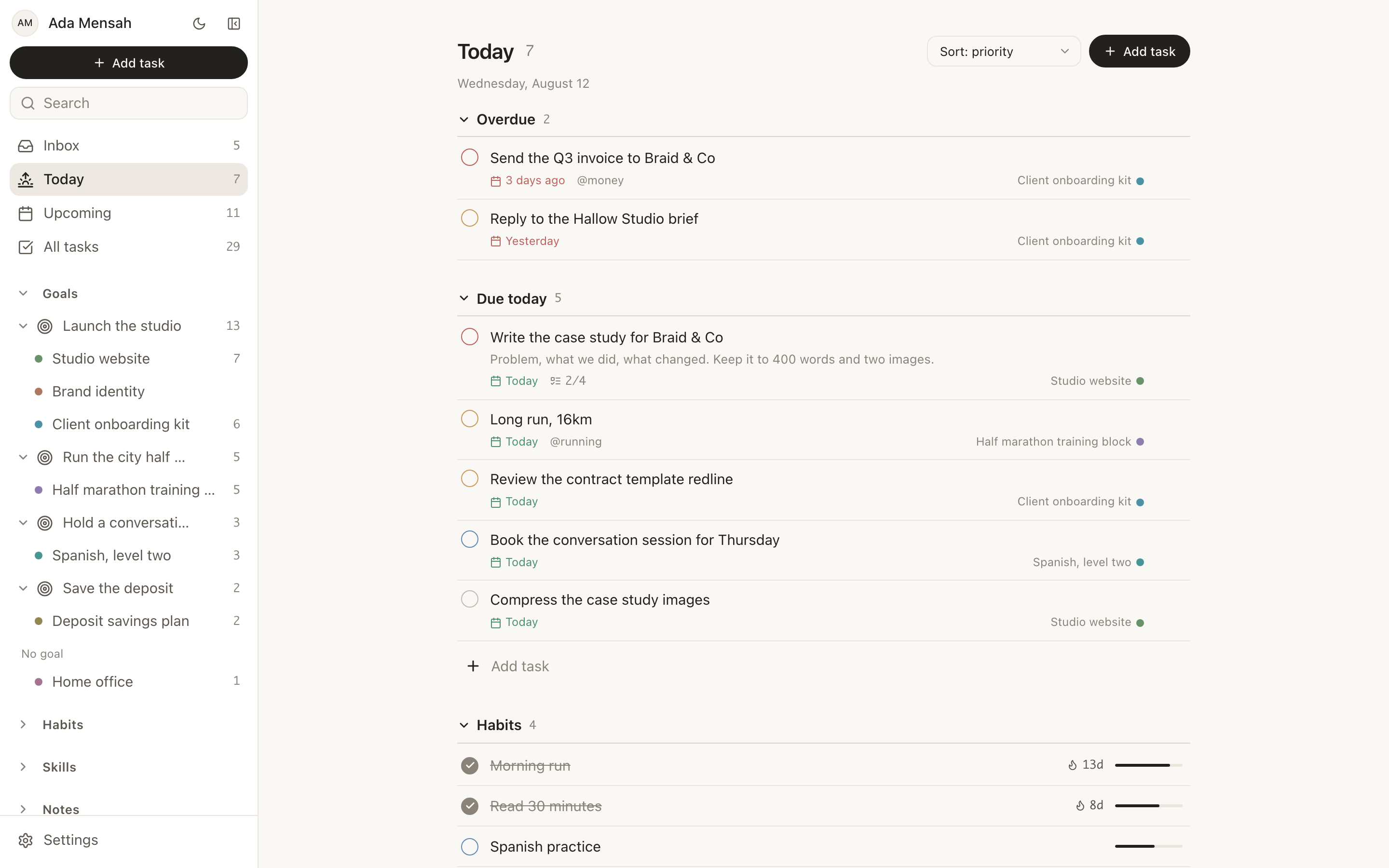
The daily screen is where the whole system either pays off or does not. In EvyOS, Today shows overdue work split out at the top, then what is due today, then the habits scheduled for the day, then the calendar. One screen, in that order, with no filtering to do first.
Upcoming covers the second horizon: the next 7 to 14 days, one section per day, which is where you notice Thursday before Thursday notices you. Task detail opens as a slide-in panel, so working through a batch never loses your place in the list.
Maintenance is the whole game
A system does not fail on the day you set it up. It fails around week 3, when the structure no longer matches the work and nothing has told you. The repair is a weekly review, and most weekly reviews are abandoned because they were designed to be thorough. Make yours short enough that a tired version of you will still do it. Three questions is enough: what moved, what is stale, what is due next week. Close what is finished, delete what you are not going to do, and move one thing forward. Twenty minutes. The weekly review ritual has a fuller walkthrough if you want a script to follow.
Two more parts of the system are worth naming because they are usually tracked in a separate app and then forgotten.
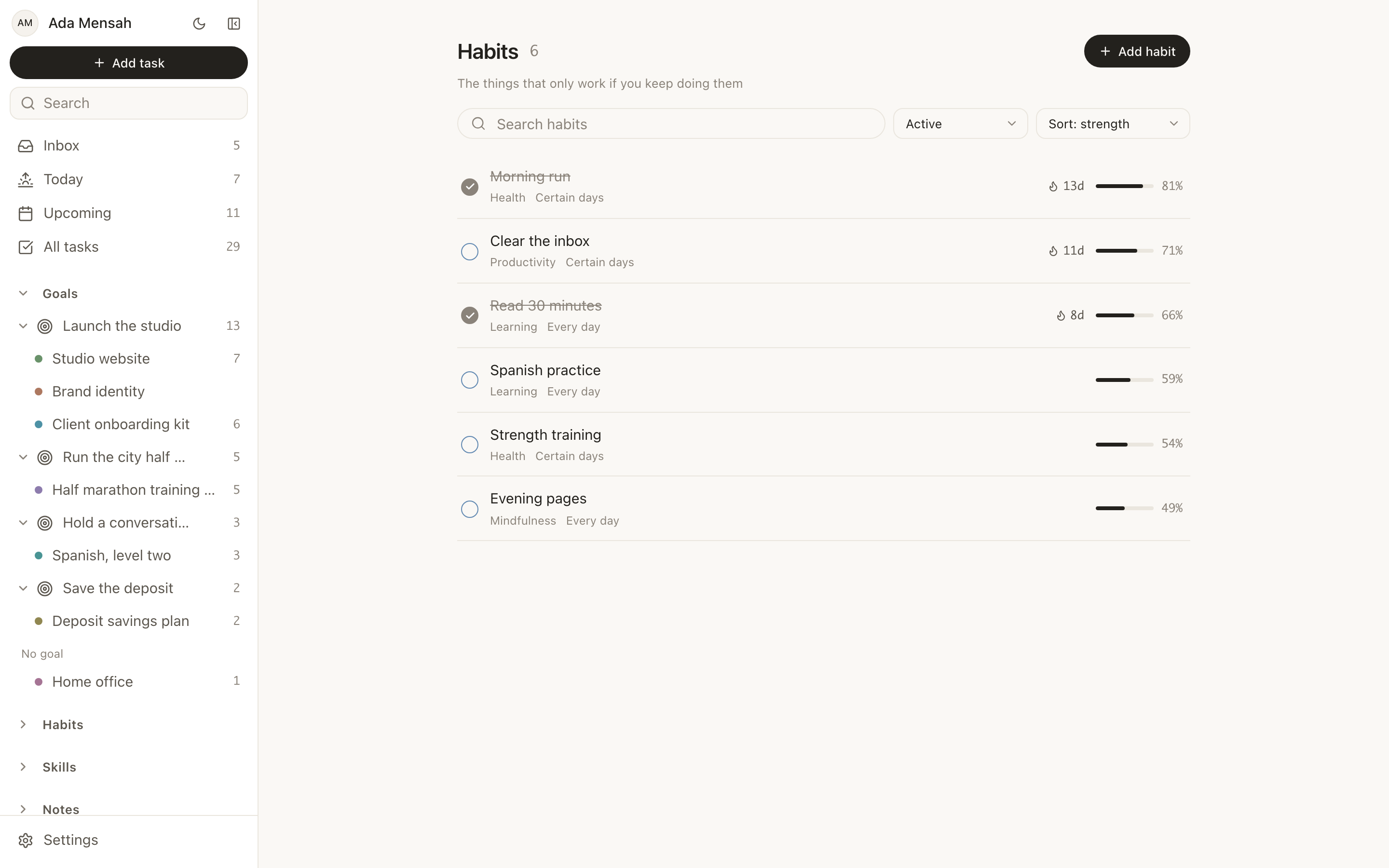
Habits are the maintenance layer: the things that do not finish. A habit in EvyOS runs on a daily or named-weekday schedule and shows a streak, a strength score derived from consistency and recency, and a year-long contribution graph. The graph matters because a streak counter only tells you about the current run, while a year of squares tells you what your actual rate is.
Skills are the layer that records deliberate improvement. A skill has a current level, a target level, and sessions logged in minutes with an activity type. Without it, the hour you spent practising disappears into a completed task and leaves no trace by March.
A 45-minute setup
If you want to stop reading and start, this is the shortest honest version.
- Write 2 or 3 outcomes for the quarter. Not 10. If everything is a priority, the list is decoration.
- Under each, name the projects that would make it true. Two to four each. A project has a deadline and milestones, so it can be visibly behind, which a folder cannot.
- Give each project its next 5 tasks only. Not every task. Enough that opening the project never requires thinking from scratch.
- Choose 3 habits, not 8. Pick the ones that maintain the projects rather than the ones that sound like a better person.
- Put the weekly review in the calendar. Same time each week, 20 minutes, recurring.
- Do not organise anything else. The rest of your archive can stay where it is. Migrating history is the most reliable way to spend a weekend and change nothing.
Where one app helps and where it does not
Splitting a system across four apps is workable. The cost is not the switching, it is that no app knows what the others hold, so the quarter never learns from the day and you become the integration layer. Keeping it in one place removes that job. EvyOS holds 7 linked record types — goals, projects, tasks, habits, skills, notes and calendar events — plus analytics, a weekly summary, and a connection graph that links any record to any other with a typed relationship. There are things it deliberately does not do: no Kanban board, no Gantt chart, no Google Calendar sync, no importers, no offline mode. If any of those is load-bearing for you, keep the specialist tool. The use cases page is a better guide to whether the shape fits than a feature list.
If your version of this problem is less about method and more about the cost of deciding what to do next, the companion piece is productivity systems for ADHD, which is about reducing friction rather than adding structure.
The free plan is enough to run everything above: 2 active goals, 5 active projects, 20 open tasks, 5 habits and 5 skill tracks, plus a weekly summary, with no card required. The limits count open items only, so finishing something returns the slot. Pro is $15 per month or $144 per year and removes the caps on goals, projects, tasks, habits and skills, and adds shared workspaces. The connector that lets ChatGPT or Claude read and change your records is on the free plan too. The details are on pricing.
Start a free EvyOS account and set up the quarter first. Everything else assembles under it.
Frequently asked questions
What is the best productivity system?
The one that covers all three horizons — today, the next 2 weeks, and the quarter — with the least maintenance you will actually perform. That is rarely one named method. Most working systems are a capture habit borrowed from GTD, a daily screen decided the evening before, and a short weekly review sitting on a small set of quarterly outcomes.
How long does it take to set up a personal productivity system?
Under an hour for the first version, if you resist migrating your archive. The setup is 2 or 3 outcomes, the projects under them, the next few tasks for each, and a recurring weekly review. Add the rest in week 3, once you can see what is missing rather than guessing.
Why do productivity systems stop working after a few weeks?
Usually because the structure has drifted from the work and nothing corrects it. Projects finish and are never closed, tasks accumulate that you were never going to do, and the list stops being trustworthy. A 20-minute weekly review is the fix, and it is the part dropped first.
How many goals should I track at once?
Two or three. The constraint is attention rather than ambition: each goal needs projects under it and those projects need weekly movement. The EvyOS free plan caps active goals at 2 for the same reason, and finishing one returns the slot.
Do I need an app, or is paper enough?
Paper is excellent for the daily page and poor at anything you need to search or count across months. A common arrangement is paper for the day and one app for the structure underneath it. The failure mode to avoid is keeping the same information in both, because then neither one is the record.
What is the difference between a productivity system and a task manager?
A task manager answers "what do I do now". A system also answers "what is this for" and "is it working". The task manager is the component people already have, which is why adding another one rarely changes anything.