The short answer: for most personal use, yes. If what you keep in Notion is a to-do list, a habit tracker and a page of goals, you are running a database-building tool to do the job of 3 small apps. You also have to maintain the system that connects them. Notion is the right choice for personal use in 2 situations: you enjoy building and adjusting systems, or your information is unusual enough that no ready-made app fits it.
The test below takes about 5 minutes and tells you which of those you are.
The 5-question test
Answer honestly, and look at your actual workspace rather than the one you meant to build.
1. When did you last change your setup, and when did you last use it? If the most recent edit to your dashboard is newer than the most recent task you ticked off in it, the system is getting more attention than the work. This is the most common reason people leave. The setup becomes a hobby that feels productive and produces nothing.
2. How many of your databases have you not opened in 30 days? Most personal Notion workspaces collect databases the way a garage collects boxes. A reading list, a meal planner, a habit tracker from a template, a quarterly review page. If more than half have gone untouched for a month, you are storing intentions, not managing work.
3. Do you use relations, rollups or formulas? These are what Notion does that simpler tools cannot. If your answer is no, you are using a notes app with checkboxes, and a real notes app or task app will do that faster. If your answer is yes and you use them every week, Notion is earning its keep. Stop reading and keep it.
4. Can you capture a task on your phone in under 5 seconds? Personal productivity lives on quick capture: the thing you remember in a queue or on a walk. If adding a task in Notion means opening the app, finding the right database and filling in properties, you probably capture less than you think. The rest ends up in your phone's notes app anyway.
5. What happens to your habit tracker on a day you miss? Template habit trackers in Notion are usually a database with a checkbox per day. They do not calculate a streak, forgive one missed day or show a year at a glance unless you build formulas for it. If yours has a column of unticked boxes you have stopped looking at, that is the template, not you.
Scoring: if you answered "the setup", "most of them", "no", "no" and "I stopped looking", Notion is overkill for what you are using it for. If you answered 3 or more the other way, it probably is not, and the problem is something a different app will not fix.
What to use instead, by what you were using Notion for
The mistake is to replace Notion with another blank canvas. Most "apps like Notion" lists recommend Obsidian, Anytype, AppFlowy or Coda, and those are all tools for building systems too. Match the replacement to the job instead:
| If Notion was mostly your… | Use | Why |
|---|---|---|
| Notes and writing | Obsidian, Apple Notes or Craft | Faster to write in, no databases to maintain |
| To-do list | Todoist or TickTick | Fast capture and typed dates, which Notion does not do well |
| Life dashboard: goals, projects, tasks and habits together | EvyOS | The structure already exists, so there is nothing to build |
| Journal | Day One or a plain notes app | Journaling needs a blank page and a date, not a database |
| Something genuinely custom: a CRM, a collection, a content calendar | Keep Notion | This is what it is for |
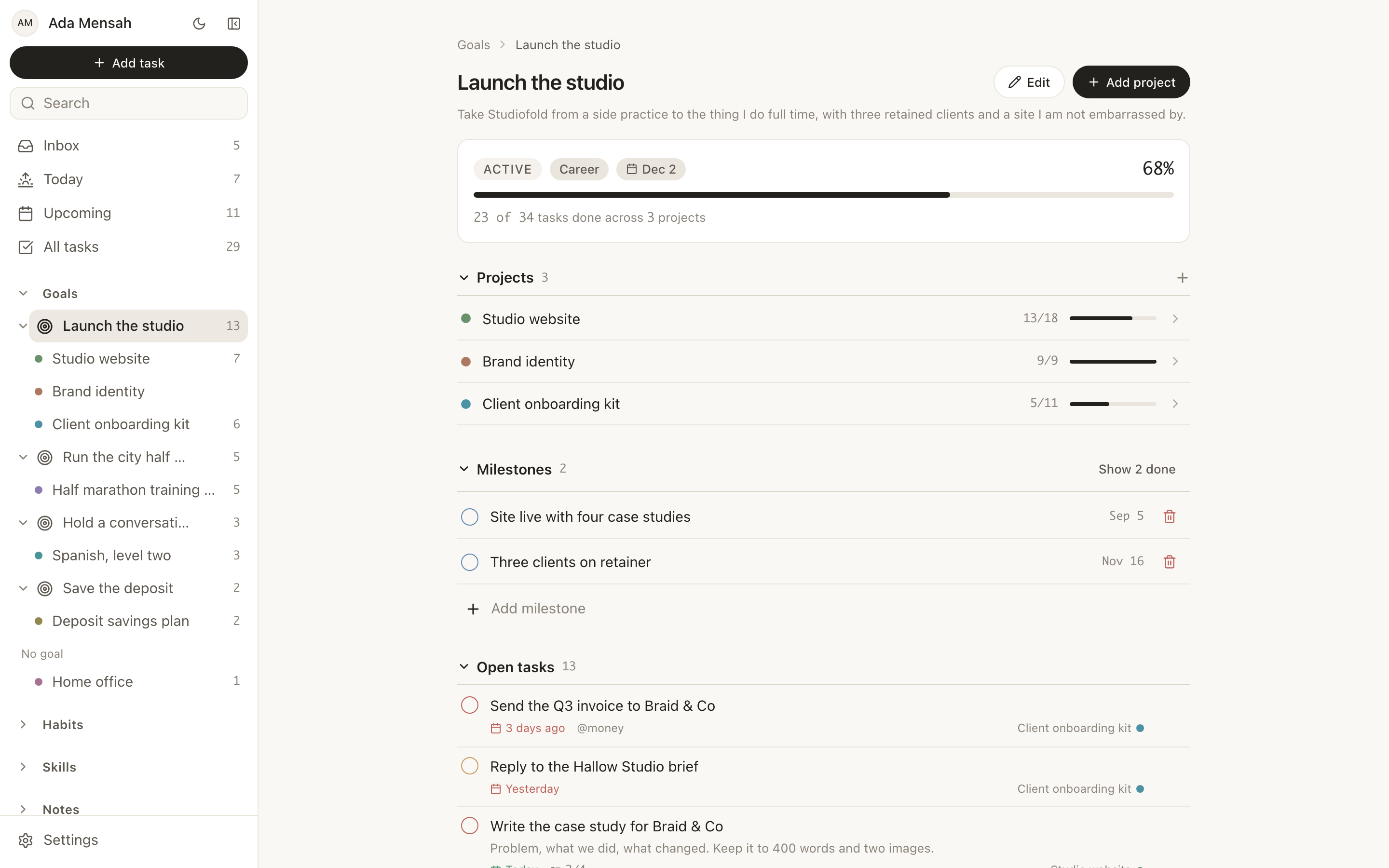
The third row is the one EvyOS is built for, so we are not neutral about it. In EvyOS, goals, projects, tasks, habits and skills are fixed record types that already link to each other. A goal's progress is calculated from the projects and tasks under it. Habits have streaks and a year view built in. There are no databases to design and nothing to fix when you forget to update a formula. The trade is real: you also cannot add a custom property, build a Kanban board or design your own page. EvyOS vs Notion sets out the whole trade row by row.
Is Notion good for planning?
For planning a project with an unusual shape, like a wedding, a house move or a book, Notion is good. You can build exactly the table you need, and it lives next to your notes about it.
For planning your days, it is weaker. Daily planning needs a view of what is due today and overdue, quick rescheduling, and recurring tasks that roll forward. You can build those in Notion, but you have to build them, and they tend to break quietly. A dedicated task app or a planner such as Sunsama will do daily planning with less effort.
If you keep Notion, make it lighter
Plenty of people should keep Notion. If that is you, these 3 changes remove most of the maintenance:
- One database for all tasks. Separate task databases per area are the main source of drift. Use one, with an Area property, and filtered views.
- Delete the dashboards you do not open. A dashboard you have to remember to visit is a page, not a dashboard. Keep one.
- Replace the template habit tracker with something that counts. Either build the streak formula once, or move habits to a dedicated habit tracker and keep Notion for everything else. Nobody needs every part of their life in the same tool.
Frequently asked questions
Is Notion worth it for personal use?
Notion's free plan covers most personal use, so money is rarely the issue. Time is: whether it is worth it depends on whether you use its databases, relations and formulas. If you do, nothing else is as flexible. If you mostly keep lists and notes, simpler tools will do the same job with less upkeep.
Why do people quit Notion for personal use?
The most common reason is maintenance. The system needs regular adjustment, and after a few months keeping it working takes more attention than doing the work in it. Slow mobile capture is the second reason, and template habit and goal trackers that do not calculate anything are the third.
What is the simplest alternative to Notion?
It depends which part you are replacing. For notes, Apple Notes or Obsidian. For tasks, Todoist. For goals, habits and tasks together, EvyOS, which has no setup because the structure is already there. Apps like Notion compares 9 options with a reason to choose each.
Can I use Notion and a simpler app together?
Yes, and for many people that is the best answer: Notion for notes and reference, and a dedicated app for the daily part — tasks, habits and goals. The only rule is that each type of thing should live in one place. Tasks in two apps means checking both, and eventually checking neither.
Want the life-dashboard version without building it? Start on the EvyOS free plan. It includes 2 goals, 5 projects, 20 open tasks, 5 habits and 5 skills, with no card and nothing to set up. Or read the Notion alternative page first.