Most people searching for apps like Notion are not unhappy with Notion. They are unhappy with the version of Notion they built. The databases drifted, the dashboard broke, the weekly review page has not been opened since spring, and reorganising it feels like more work than the work itself.
So the useful question is not "what replaces Notion" but "which part of Notion am I actually using". This guide is a shortlist of 9 tools, each with one clear reason to pick it and one honest reason not to. It also states plainly what Notion still does better than any of them, because for a lot of readers the right answer is to keep Notion and stop asking it to be a life tracker.
The short version: pick EvyOS if you want goals, projects, tasks, habits and skills already wired together. Pick Obsidian or Craft if Notion was really your notes app. Pick Todoist or TickTick if it was really your to-do list. Pick Sunsama if the problem is the day, not the system. Pick Coda, GoodDay or Anytype if you genuinely want the Notion shape and are only unhappy with this particular implementation of it.
What people mean by "apps like Notion"
Notion is 4 products in one page: a document editor, a database, a wiki and a lightweight project tracker. When someone asks for something like it, they usually mean one of three different things.
Notion-shaped, different execution. You like building your own structure. You want tables, relations and formulas. You are shopping for a different flavour of the same idea. Coda, Anytype and GoodDay live here.
Notion minus the building. You want the outcome, not the construction. Something that already knows what a goal is, what a habit is and how they relate, so you can put your work in and get on with it. EvyOS lives here.
One part of Notion, done properly. You were using one or two of its 4 jobs. Notes go to Obsidian or Craft. Tasks go to Todoist or TickTick. The daily plan goes to Sunsama.
Deciding which of those three sentences describes you takes about a minute and saves a month of trialling the wrong category.
The shortlist at a glance
| App | Closest to the Notion job of | Pick it if |
|---|---|---|
| EvyOS | Personal dashboard and trackers | You want structure that already exists, and you track habits and skills as well as tasks |
| Obsidian | Wiki and personal knowledge base | Your notes matter most and you want plain files on your own disk |
| Craft | Documents and beautiful pages | You write and share documents, and how they look is part of the point |
| Todoist | The task database | You mostly needed a fast, reliable to-do list |
| TickTick | Tasks plus a habit table | You want tasks and habits in one place with a timer attached |
| Sunsama | The daily dashboard page | Your system is fine; your days are not |
| Coda | Docs with tables and automations | You want the database model with a stronger document and formula story |
| Anytype | The whole Notion shape, local | You want objects, relations and a graph, stored on your own device |
| GoodDay | Team projects and internal docs | A group needs schedules, workflows and reporting, not a wiki |
1. EvyOS: the structure is already there
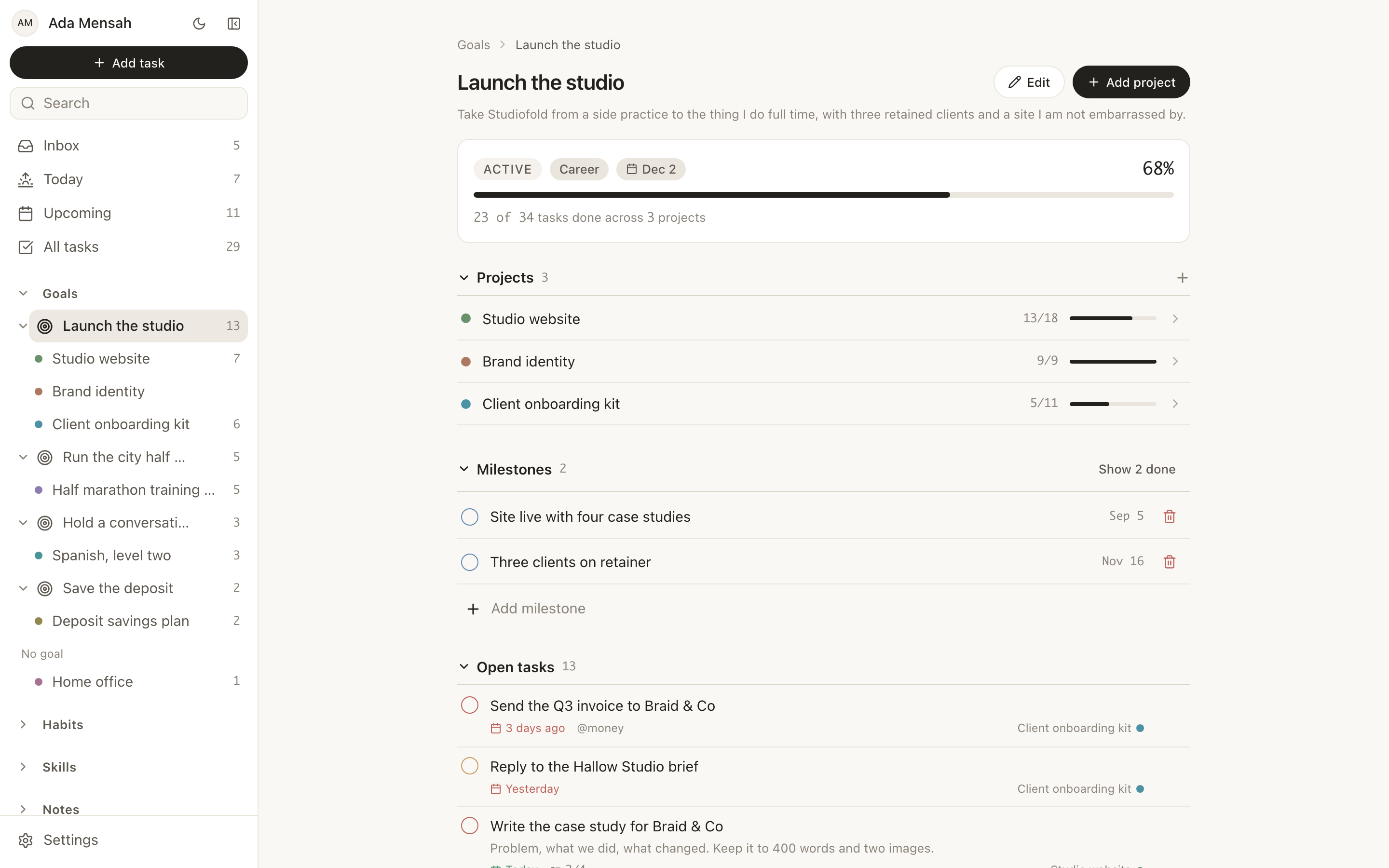
EvyOS is a personal operating system with 7 linked record types: goals, projects, tasks, habits, skills, notes and calendar events. You do not create them as databases. They exist on the first day and already know how they relate.
What it takes off your plate. Projects hang off goals. Tasks hang off projects, and a task with no project sits in an unsorted inbox rather than vanishing. Goal progress is calculated from the work underneath it and cannot be typed in, so a goal cannot sit at 80 per cent while nothing beneath it moves. Habits and skills are records in the same account, not a table you designed to imitate one.
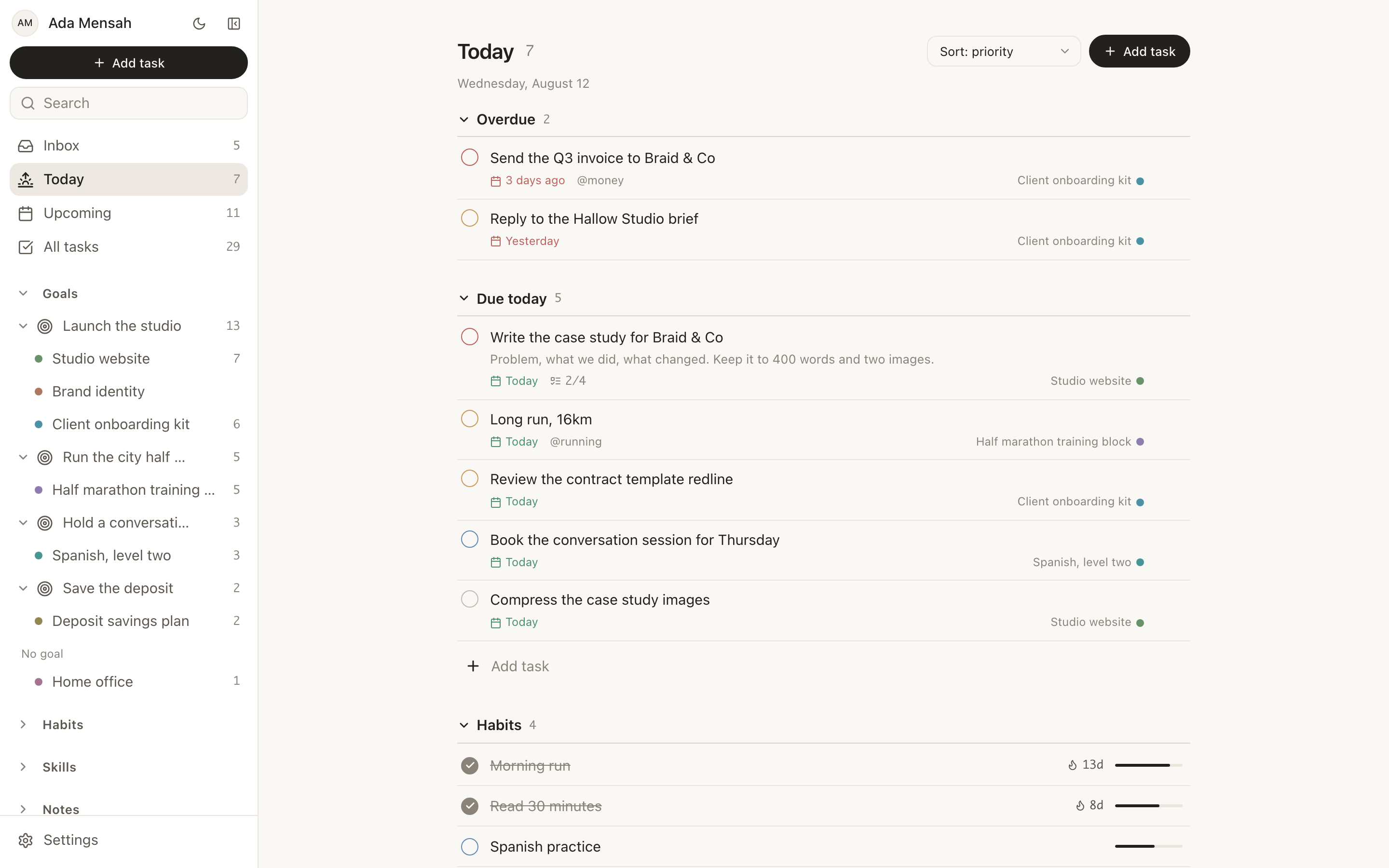
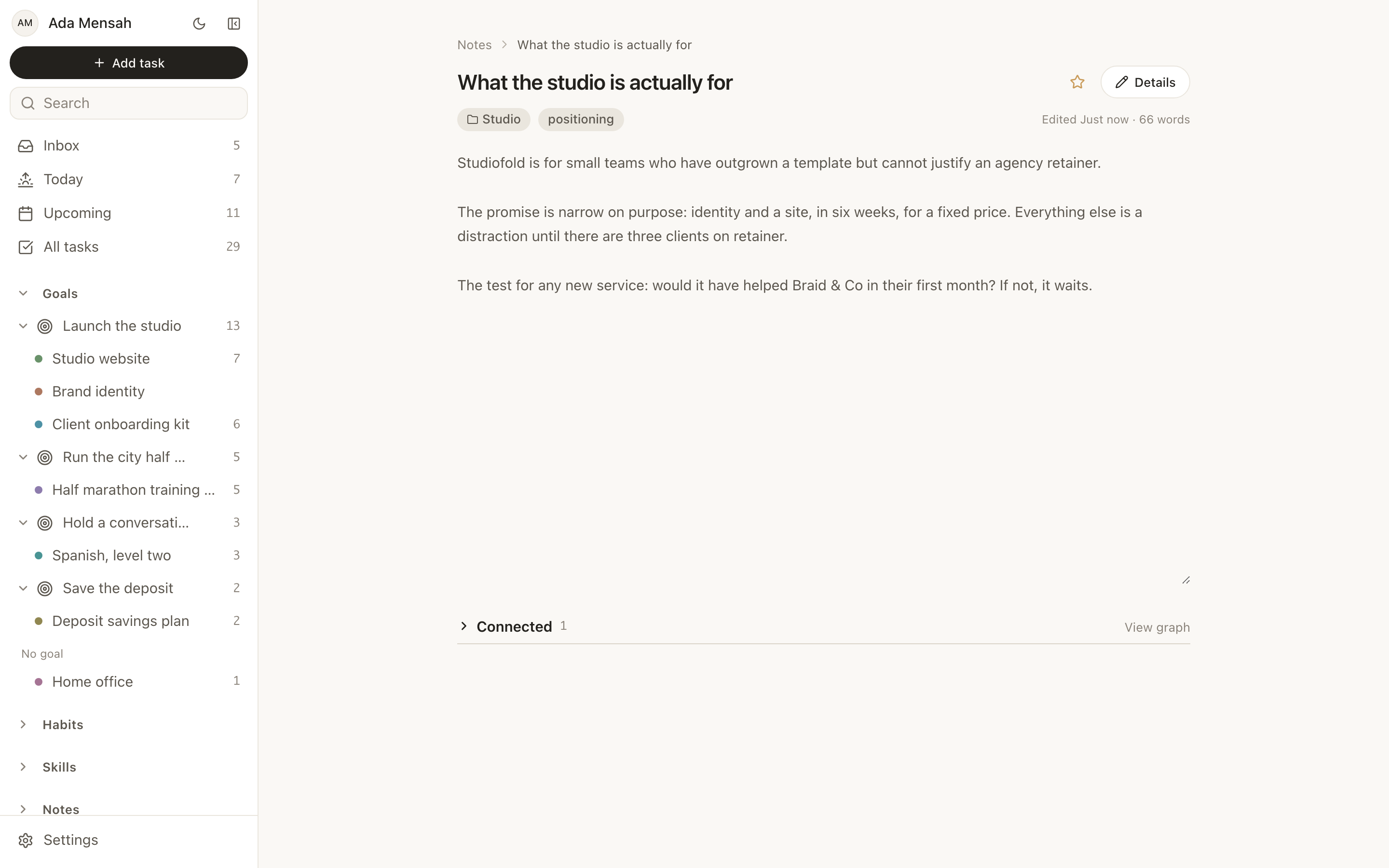
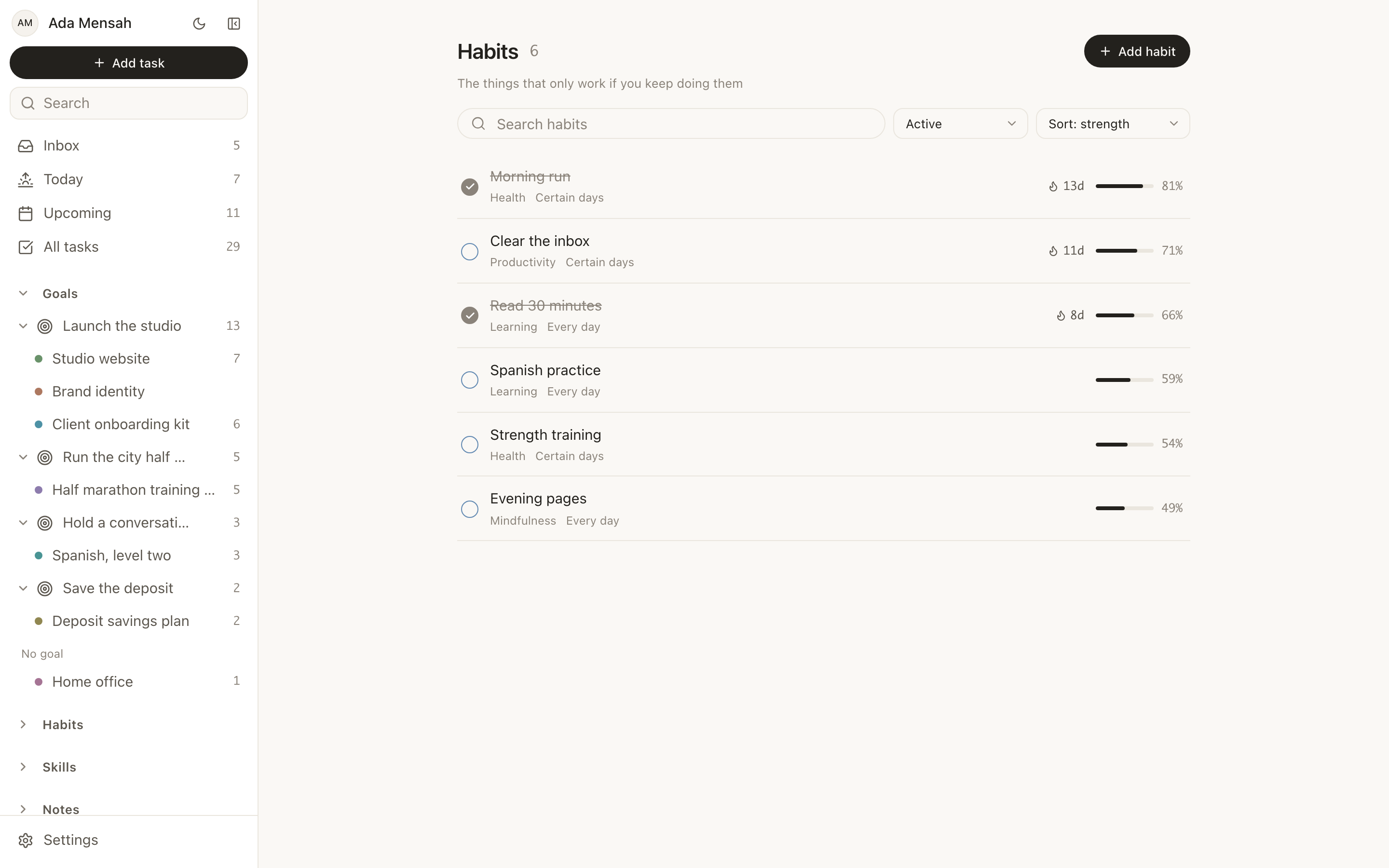
Key features. Tasks carry 4 priority levels, a due date, estimated and actual minutes, subtasks, comments, attachments, tags and recurrence. Habits run daily or on named weekdays and keep a streak, a strength score built from consistency and recency, and a year-long contribution graph. Skills hold a level and a target level, and you log practice sessions in minutes against an activity type. Notes are markdown with folders, tags, full-text search, version history, [[Title]] wiki-links with backlinks, and a public share link. A connection graph links any record to any other with a typed relationship, so a note can be attached to the project it belongs to and found from either end.
There are 2 views for daily work, Today and Upcoming, and neither is configurable. That is deliberate and it is the trade. You cannot make them into something else, and you also cannot break them.
What you give up. No custom databases, no custom properties, no formula fields, no freeform page building. If those are the reason you use Notion, EvyOS will feel narrow, and you should stay where you are.
Pricing. The free plan covers 2 active goals, 5 active projects, 20 open tasks, 5 habits and 5 skill tracks, plus a weekly summary. The limits count open items only, so finishing something frees the slot rather than pushing you into an upgrade. Pro is $15 a month or $144 a year and adds unlimited goals, projects, tasks, habits and skills, and shared workspaces. The details are on the pricing page.
Best for. People who want one account for what they are building, doing and becoming, and who would rather answer to a structure than design one.
2. Obsidian: your notes as plain files
If you audit your Notion workspace and find that 90 per cent of it is prose, you were using a notes app.
What it is like. Obsidian reads and writes markdown files in a folder on your own machine. Notes link to each other, backlinks show up automatically, and a graph view makes the shape of your thinking visible. A large plugin community extends it well past note-taking.
What you give up. It is not a task manager, and the versions of one that people build with plugins need maintenance in the same way a Notion dashboard does. Collaboration is weak compared with Notion. Sync across devices is a paid add-on rather than a default.
Best for. Writers, researchers and anyone who wants their notes to outlive the app they were written in.
3. Craft: documents that look finished
What it is like. Craft is a document editor with unusually good defaults. You write, and the page already looks like something you would send to a client. Blocks, tables and embedded media behave the way you expect, and shared documents read well in a browser without configuration.
What you give up. It is not a productivity system. No habits, no goals, no real project tracking. It is strongest on Apple platforms, which matters if your work is split across Windows or Linux.
Best for. People who used Notion as a beautiful knowledge base and a place to send polished documents to other people.
4. Todoist: the fast, boring, reliable list
What it is like. Todoist is a task manager that has been refined for a long time. Quick-add parses natural language, so typing a task with a date in the sentence files it correctly. Projects, labels, filters, recurring tasks and board views are all there, and it syncs everywhere without drama.
What you give up. No habits, no skills, no long-range goal structure and no real notes. If you want daily consistency tracked, you will end up adding a second app.
Best for. People whose Notion setup was, honestly, a to-do list with extra steps. If you are weighing the two directly, our Todoist comparison covers that ground.
5. TickTick: tasks with habits attached
What it is like. TickTick does tasks well and adds a habit section and a pomodoro timer in the same app. A calendar view puts both on one grid. For a lot of people this is the cheapest possible exit from Notion that still tracks consistency.
What you give up. Habits are a section rather than a pillar; they do not connect to anything larger. There is no goal hierarchy, no skill tracking and no notes layer worth the name.
Best for. People who want one subscription instead of two, and whose system does not need to explain why a habit matters.
6. Sunsama: a ritual, not a database
What it is like. Sunsama is a daily planning tool. Each morning you pull work in from your calendar and your task apps, estimate how long each item will take, and commit to a realistic day. Each evening you close it out and reflect.
What you give up. It is a layer, not a system of record. It expects you to keep your tasks somewhere else, so it adds a subscription rather than replacing one, and it is among the more expensive tools on this list.
Best for. People whose organisation is fine and whose execution is not.
7. Coda: the database model, with better documents
What it is like. Coda starts from the document rather than the database. Tables live inside pages, formulas are closer to a spreadsheet than to Notion's property language, and buttons and automations let a doc do work rather than only hold information.
What you give up. The same thing you were escaping. Coda is a build-it-yourself tool, and a personal system in Coda needs the same design, maintenance and eventual rebuild that a Notion one does.
Best for. Teams whose documents need to calculate, and people who like the Notion idea and dislike the Notion execution.
8. Anytype: Notion-shaped, stored on your device
What it is like. Anytype is an open-source, local-first workspace built from objects, types and relations, with a graph over the top. It is the closest thing on this list to Notion's mental model, with the difference that your data is encrypted and lives on your own devices by default.
What you give up. It is younger than the tools it competes with, and the ecosystem, templates and integrations reflect that. If you need a specific integration today, check before you migrate.
Best for. People who want Notion's flexibility and are switching for reasons of ownership and privacy rather than simplicity.
9. GoodDay: when the real problem is a team
What it is like. GoodDay is a project management platform with documents attached. Schedules, workflows, task types, dashboards, reporting and multiple views of the same work. Teams that ended up running delivery out of a Notion database usually want something like this instead.
What you give up. It is not a personal productivity tool. Used alone it is far more machinery than one person needs, and there is no habit or skill tracking in it at all.
Best for. Product, marketing and delivery teams that need coordination and reporting, with internal docs kept alongside.
How does EvyOS differ from Notion
This is the comparison most readers of this page are actually running. It is a trade, not an upgrade, so both columns are stated plainly.
| Notion | EvyOS | |
|---|---|---|
| Where structure comes from | You design it, from databases, properties and views | 7 fixed record types: goals, projects, tasks, habits, skills, notes, events |
| Custom databases and properties | Central to the product | None |
| Formulas and rollups | Yes | None. Goal progress is calculated from the work underneath and cannot be typed in |
| Views | You build and configure them | Today and Upcoming, both fixed |
| Page building | Freeform pages, nested infinitely | Records with defined fields; no page canvas |
| Task fields | Whatever properties you add | Fixed: 4 priority levels, due date, estimated and actual minutes, subtasks, comments, attachments, tags, recurrence |
| Habits | Build a database and maintain it | Built in: daily or named-weekday schedule, streak, strength score, year-long contribution graph |
| Skills | Build a database and maintain it | Built in: level, target level, practice sessions logged in minutes with an activity type |
| Notes | The heart of the product: docs, wikis, nesting | Markdown with folders, tags, full-text search, version history, [[Title]] wiki-links with backlinks, public share link |
| Linking records | Relations between databases, plus mentions | A connection graph: any record to any other, with a typed relationship |
| Kanban boards | Yes | No |
| Templates | A very large public template community | Nothing to configure, and so nothing to browse |
| Sharing with other people | Workspaces, granular permissions, guests | Shared workspaces: 5 people included, then $3 per person a month, and only the subscriber is ever billed |
| AI | Notion's own assistant, inside the workspace | Connects ChatGPT or Claude to your account over MCP on every plan, so you use the assistant you already pay for |
| Calendar | Its own calendar product and integrations | Events inside EvyOS. No Google Calendar or iCal sync |
| Importing | Imports from many tools | No Notion importer. Notes move as markdown; the rest is manual |
| Offline | Partial, with a local cache | No offline mode |
The row that decides it for most people is the second one. Custom databases are the reason Notion can be anything, and the reason your workspace needs looking after. Removing them removes both.
What Notion is still better at
Being fair here is more useful than being persuasive, because a reader who switches for the wrong reason comes back annoyed.
Notion is genuinely the strongest tool on this page for team documentation and wikis. Nothing here matches it for writing, structuring and finding a body of shared knowledge. Its databases really can model anything, and when a problem is unusual, that flexibility is worth the maintenance. Its template community means somebody has probably already built the thing you were about to build. Its permissions and guest access are more granular than most of these tools offer. And if your work is inherently structured around records with unusual fields, a CRM, a content calendar, a reading list with 9 properties, then no opinionated tool will fit it, and you should keep Notion for that.
The switch makes sense when you notice you are maintaining the system more often than you are using it. It does not make sense because a comparison post told you Notion is complicated.
If you are a freelancer
A freelancer's problem is that the work and the business are the same person's calendar. Client work has deadlines and other people attached. The business, which is where next quarter's income comes from, has neither, and so it quietly loses.
What matters in this situation is that non-urgent work stays visible. A goal such as "3 retainer clients by June" needs to sit above the projects that serve it, so that a week of pure client delivery looks like what it is. That is the case for an opinionated tool: EvyOS shows the outreach project stalling next to the client work that is thriving, without you building a rollup to notice it.
Two smaller things matter more than they sound. Tasks carry estimated and actual minutes, which over a couple of months tells you which kind of client work you consistently underquote. And skills are tracked as practice, so the afternoon spent learning a tool you want to sell next year is recorded rather than lost.
Be clear about what is not here, because freelancers ask for it often. There is no CRM or contact manager, no invoicing, no expense tracking, and no time tracking meant for billing. Those stay in whatever you already use. If your Notion workspace is mostly a client pipeline with custom fields, a simpler personal tool will not replace it, and Todoist plus your existing invoicing app may be the cheaper honest answer. There is more on this in our guide for freelancers.
If you are a team
For a team, the question changes completely. It is no longer "which app suits me" but "which app will 4 other people still be using in 3 months". Adoption beats capability, and the tool that wins is usually the one that asks the least of the least enthusiastic person on the team.
Two distinct needs get confused here. If the team needs shared documentation, a wiki, meeting notes, specs, onboarding, then Notion is the best answer on this page and you should keep it. If the team needs coordinated delivery, schedules, workflows and reporting, then GoodDay or a dedicated project tool will do it better than a Notion database.
EvyOS covers the third case: a small group that wants shared, tracked work without a rollout. A shared workspace puts goals, projects and tasks in a common space where records are assigned and visible, and it is the natural fit for a founder and 2 contractors, a household, or a small team already using EvyOS individually. The billing is deliberately simple: 5 people are included in the subscription, additional people are $3 each a month, and only the subscriber is ever billed. Nobody you invite is asked for a card, which removes the awkward conversation that kills most small-team rollouts. Adding a sixth person bills you; it never blocks them.
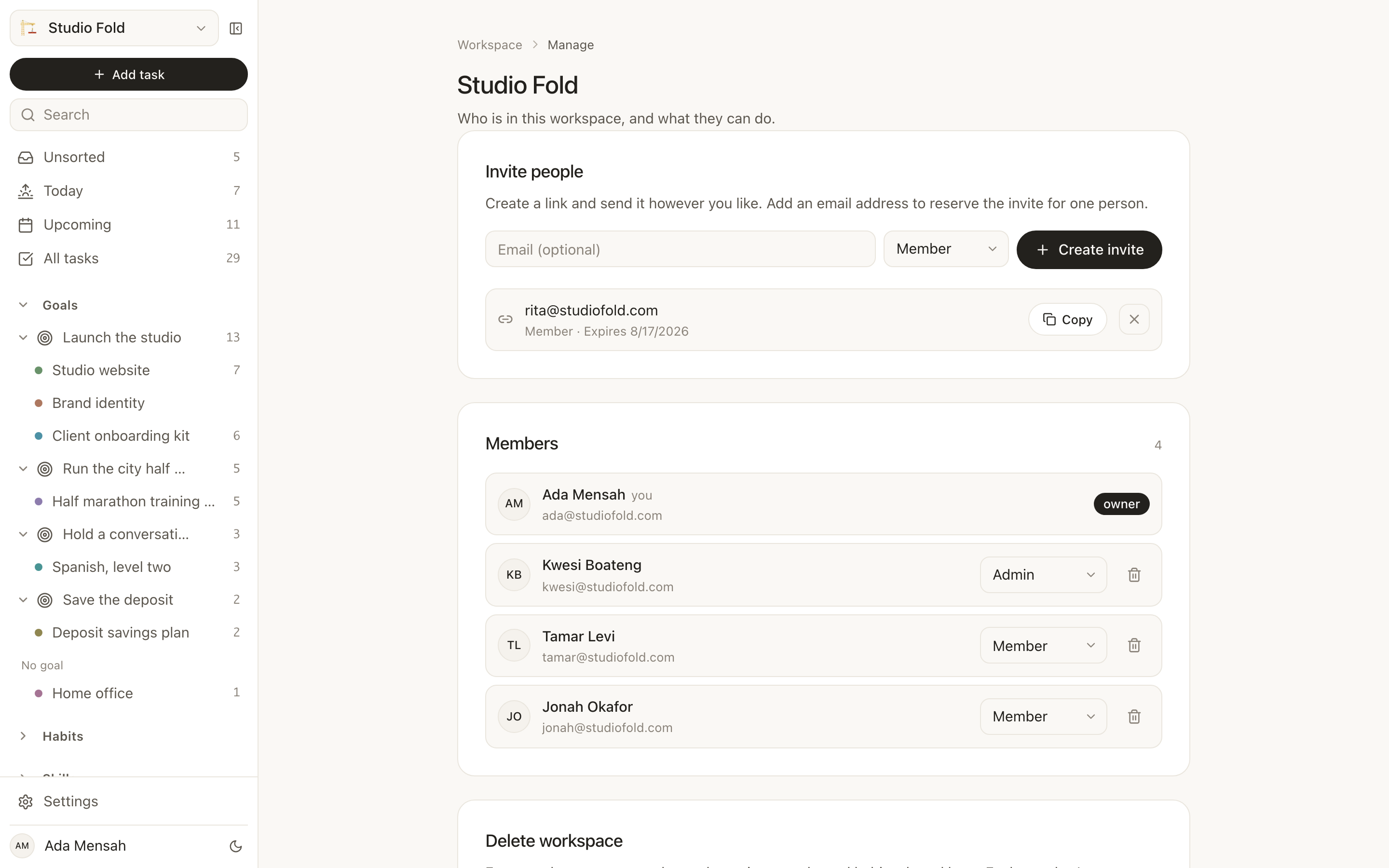
What a team does not get from EvyOS: no Kanban board, no Gantt chart, no custom fields on a task, and no wiki-grade permissions model. For a team of 3 that is usually fine. For a team of 30 it is not, and you should be looking at real project management software. Our families and small groups guide covers the smaller end in more detail.
How to choose in the next 5 minutes
Open your Notion workspace and look at what you touched in the past 2 weeks, not what you built.
If it was almost all pages of prose, you need a notes app. Try Obsidian if you want the files to be yours, Craft if you want them to look good.
If it was a task database with a couple of views, you need a task manager. Todoist if the list is the whole job, TickTick if you also want habits and a timer.
If it was a dashboard you check every morning and then ignore, the problem is your day. Sunsama addresses that directly, on top of whatever you keep.
If it was 4 or 5 half-built trackers that never quite talk to each other, you want the trackers to exist already. That is the EvyOS case for leaving Notion, and the fuller feature-by-feature version is in EvyOS vs Notion.
If it was a genuinely custom database that no opinionated tool would model, stay. Delete the dashboards you never open, keep the one database that earns its keep, and stop trying to make Notion into a life tracker.
Frequently asked questions
What is the best app like Notion for personal use?
It depends on which part of Notion you were using. For a personal system that tracks goals, projects, tasks, habits and skills together, EvyOS is built for that shape and needs no setup. For personal knowledge management, Obsidian. For a personal to-do list, Todoist. There is no single best app, only a best match for the job you were doing.
Is Notion overkill for personal use?
For a to-do list, a habit tracker and a page of goals, usually yes. You are maintaining a database system to do the job of 3 small apps. It is not overkill if you use relations, rollups and formulas every week, or if your information is unusual enough that no ready-made app fits it. Is Notion overkill for personal use? has a 5-question test to tell which applies to you.
Is there a simpler alternative to Notion?
Yes, and simplicity comes from removing flexibility rather than from a tidier interface. Todoist is simpler because it only does tasks. EvyOS is simpler because the structure is fixed: there are no databases to design, no properties to define and no views to configure, so there is nothing to maintain. Anything that keeps custom databases, including Coda and Anytype, will feel about as demanding as Notion did.
Can I move my Notion data to another app?
Partly. Notion exports a workspace as markdown, HTML, CSV or PDF, and the markdown moves cleanly into notes apps such as Obsidian and Craft. Structured data is harder: a database exported to CSV has to be mapped onto whatever the new tool calls those fields. EvyOS has no Notion importer, so notes come across as markdown and projects and tasks are entered by hand. In practice most people re-enter only what is still active, which is a smaller list than expected and a useful audit in itself.
What is a good Notion alternative that has habit tracking?
TickTick, if you want tasks with habits attached. EvyOS, if you want habits treated as their own record type with a daily or named-weekday schedule, a streak, a strength score built from consistency and recency, and a year-long contribution graph, all linked upward to the goal they serve. Building either of those in Notion is possible and is exactly the sort of thing that stops being maintained by March.
Do any apps like Notion work with ChatGPT or Claude?
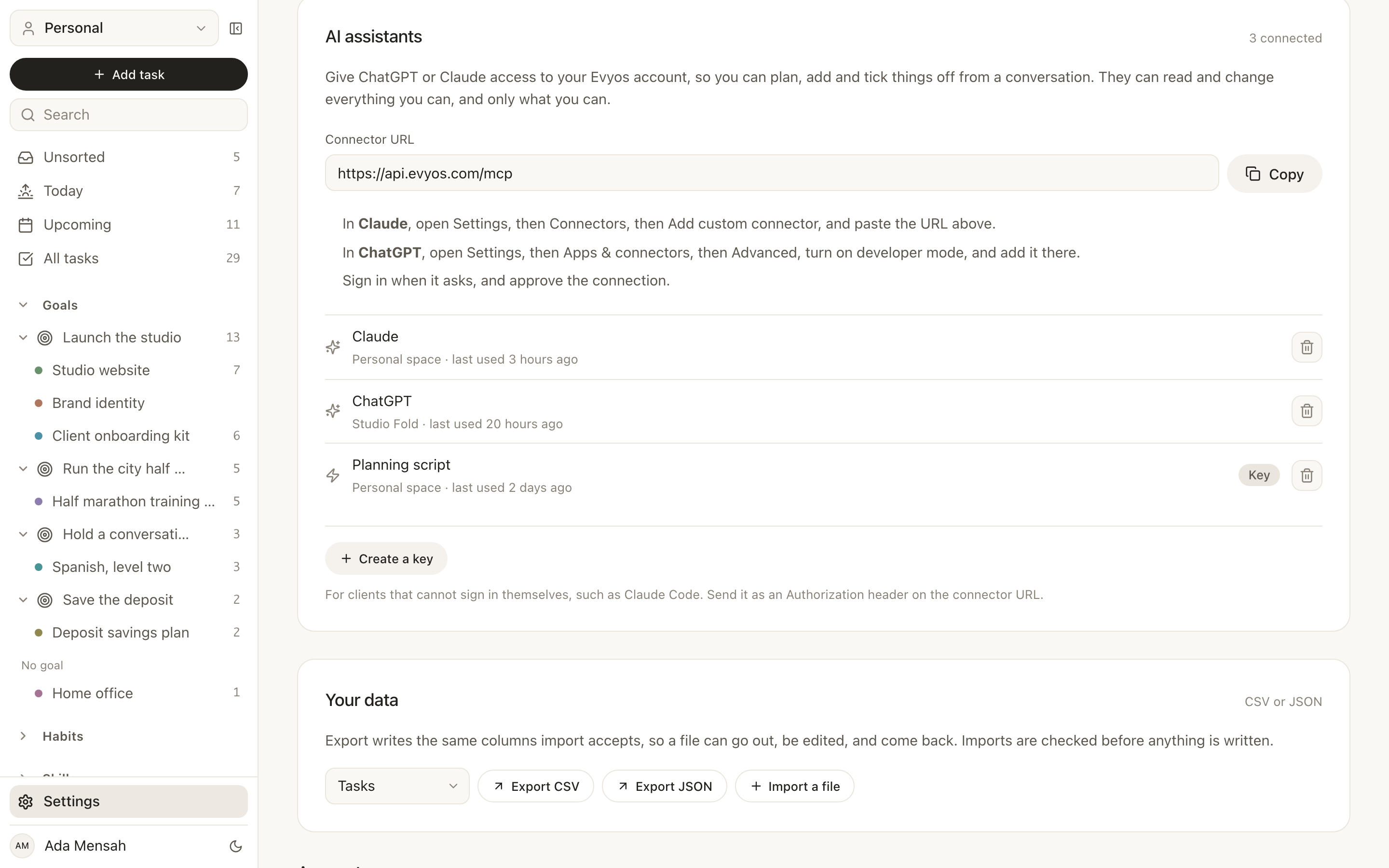
EvyOS connects to both on every plan, including free. You paste one URL into ChatGPT or Claude and the assistant can then read and create your goals, projects, tasks, habits, skills and notes over MCP, using the plan you already pay for rather than a second AI subscription. You can ask it what is overdue, have it file a week of work, or get it to write your weekly review from your actual records. Notion has its own official connector too; to-do apps that work with ChatGPT and Claude compares what 12 apps let the assistant reach.
Is EvyOS free, and what do the limits actually restrict?
There is a free plan with 2 active goals, 5 active projects, 20 open tasks, 5 habits and 5 skill tracks, plus a weekly summary. The limits count open items only, so completing a task or closing a project frees the slot again. That is the difference between a cap on what you may ever do and a cap on how much you may have in flight at once. Pro is $15 a month or $144 a year and removes the limits, and adds shared workspaces. The pricing page has the full list.
Should I use one app or several?
Several works, and many people run notes in Obsidian, tasks in Todoist and a habit tracker beside them. The cost is that nothing knows about anything else: your habits cannot show up next to the goal they serve, and you carry the connections in your head. One app costs you specialisation instead. Pick several tools if one area of your work is unusually demanding, and a single tool if the value is in seeing how the parts relate.
Can a small team use a Notion alternative without paying per person?
Not usually, but the shape differs. Most team tools charge per seat from the first person. An EvyOS shared workspace includes 5 people in the subscriber's plan, charges $3 a month for each person beyond that, and never bills anyone but the subscriber, so invitees are not asked for a card. For a founder with 2 contractors or a household, that is the practical difference between everyone joining and 2 people joining.
Key takeaways
- Diagnose before you shop. Notion does 4 jobs; you were almost certainly doing one or two of them. The right alternative depends entirely on which.
- Simplicity is a removal, not a redesign. A tool is only lighter than Notion if it takes away custom databases. Anything that keeps them keeps the maintenance too.
- Notion is still better at wikis, team documentation and genuinely custom data. If that describes your workspace, stay, and cut the dashboards you never open.
- EvyOS trades flexibility for structure. Goals, projects, tasks, habits, skills and notes exist on the first day and are already linked; there are no custom databases, no formulas and no page canvas, and that is the deal.
- Freelancers should look for goal-level visibility, so business development does not quietly lose to client work every week.
- Teams should ask what the least enthusiastic person will still open in 3 months, and pick documentation, delivery or shared personal tracking rather than hoping one tool covers all 3.
- The tool you maintain least is the one you will still be using next year.