The short answer: no, not built in. Todoist has no habit record: a habit is a recurring task. Todoist makes a free Habit Tracker extension that adds a streak to a recurring task. It writes the streak into the task's description and the history into its comments, and it resets the streak to zero if the task goes overdue, or is postponed or rescheduled. There is no calendar or history view.
For one or two simple daily habits, that is enough. If you want streaks that survive a busy week, habits on specific weekdays, or a view of the past year, you need a dedicated habit tracker. Some task apps, TickTick and EvyOS among them, have one built in.
Checked against Todoist's own help centre on 23 September 2026.
How habit tracking works in Todoist
There are 2 pieces, and they work together.
1. A recurring task. You type something like "Read 20 pages every day" and Todoist creates a task that comes back each day. The difference between every and every! matters for habits:
every 3 daysschedules from the task's original date.every! 3 daysschedules from the day you actually complete it.- For daily tasks, Todoist uses the completion date either way.
If a recurring task goes overdue, Todoist only reschedules it for future dates. Days you missed are skipped, not queued up.
2. The Habit Tracker extension. Open the task's menu and choose Track habit. From then on, according to Todoist's help article:
- the current streak is written into the task description, replacing whatever was there;
- each completion is logged as a comment on the task;
- it works with daily tasks and tasks on specific recurring days;
- vacation mode keeps tracking your progress while it is on.
The extension is made by Todoist, and it is available on the free Beginner plan as well as Pro and Business.
Where it stops
These are Todoist's own documented rules, not complaints from reviews:
| Limitation | What it means in practice |
|---|---|
| Streak resets if the task is overdue, postponed or rescheduled | Moving tonight's run to tomorrow morning costs you the streak, even though you ran. So does one late night |
| Every new streak starts at zero | You cannot bring a 60-day streak over from another app |
| The streak lives in the task description | Anything else you had written there is overwritten |
| History is only comments | No calendar, no heatmap, no view of a month or a year |
| Set up on web or desktop | Todoist lists web, macOS, Windows and Linux for the extension |
| Habits are tasks | They share the same list as your work. A skipped habit becomes an overdue task sitting among your deadlines |
Todoist also has a Productivity view with its own streaks, but those count days on which you completed a set number of tasks overall. They do not track any particular habit.
The last row is the one people underestimate. A missed daily task stays on your list as overdue until you deal with it. A habit is different: missing yesterday's walk should not be something to clear before you can see today.
When Todoist's approach is enough
- You have 1 or 2 daily habits, and you care whether you did them, not about streak statistics.
- You rarely reschedule. If you do the habit or skip it, the reset rule rarely bites.
- You want everything in one list and do not mind habits sitting among your tasks.
In that case, set up the Habit Tracker, use every day for daily habits, and move on. A second app would cost you more than it gives.
When you want a real habit tracker
- You reschedule often. If the reset rule would have broken your streak in a normal week, the streak stops meaning anything.
- Your habits are not daily. Gym on Monday, Wednesday and Friday, or reading on weekdays only.
- You want to see the pattern. A year view shows at a glance which weeks slipped, which a column of comments cannot.
- You want habits linked to a goal. "Run 3 times a week" is part of "run a half marathon in March", and the progress on one should be visible from the other.
There are 3 common ways to get there:
Keep Todoist and add a separate habit app (Streaks, Loop, Habitica). This is the smallest change for your tasks, but you now have 2 apps that do not know about each other.
Switch to TickTick. It is the closest thing to Todoist with a habit tracker built in. On its free plan you get 5 habits, and Premium raises that to 299. Its habits are a separate section from tasks and are not linked to goals or projects.
Use EvyOS. Habits are their own record type, alongside goals, projects and tasks. EvyOS is our product, so read this part knowing that:
- a habit runs daily or on named weekdays, and the streak counts only scheduled days, so a Monday-Wednesday-Friday habit is not broken by Tuesday;
- today being unfinished does not end the streak, because there is still time;
- a strength score combines consistency with recency, so one missed day lowers it a little instead of wiping it to zero;
- a year-long graph shows every day at a glance;
- a habit can sit under the goal it serves, and the goal's progress is calculated from the work underneath.
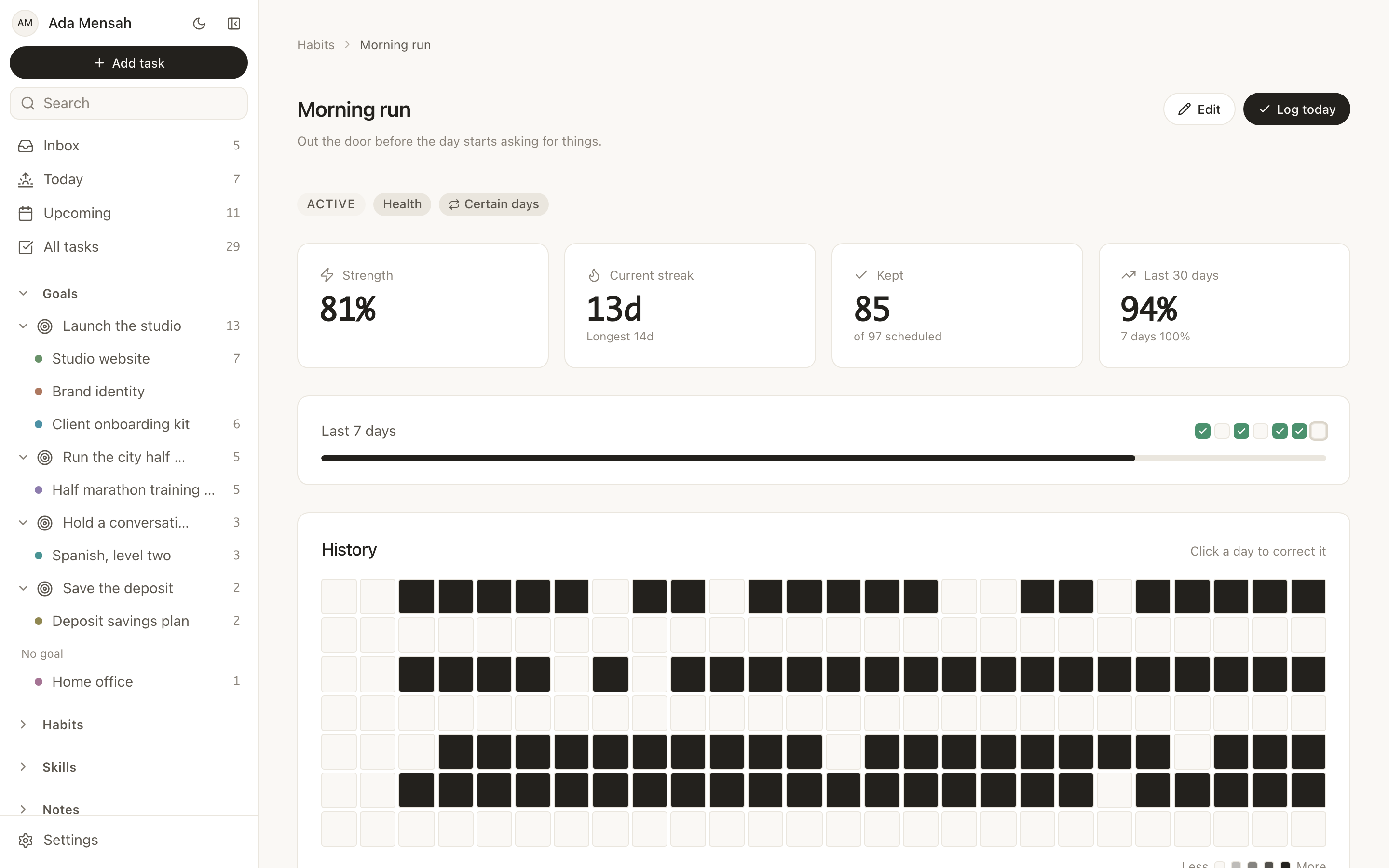
What you would lose moving from Todoist to EvyOS: typed dates like "every weekday at 7am" (EvyOS uses a form), an importer, and Todoist's integrations. EvyOS vs Todoist sets out the full trade, and alternatives to Todoist compares 8 options.
Frequently asked questions
Is the Todoist Habit Tracker free?
Yes. The extension is made by Todoist and is available on the free Beginner plan as well as Pro and Business. Todoist Pro itself costs $5 a month billed yearly ($60) or $7 billed monthly, since December 2025.
Why did my Todoist habit streak reset?
The Habit Tracker resets the streak whenever the task becomes overdue, is postponed or is rescheduled to another day, even if you did the habit. Completing it late, or moving it to tomorrow, counts as a break.
Can Todoist track habits on specific days?
Yes. The Habit Tracker works with tasks on specific recurring days, such as every mon, wed, fri, as well as daily tasks.
What is the best habit tracker to use with Todoist?
If you are keeping Todoist, a standalone habit app like Streaks (Apple) or Loop (Android) keeps habits out of your task list. If you want habits and tasks in one app, TickTick is the smallest change. If you want habits, goals and tasks connected, see EvyOS.
Can I see a history or calendar of my Todoist habits?
Not with the Habit Tracker. History is kept as comments on the task, one per completion, and Todoist's help centre documents no calendar or heatmap view.
Want a habit tracker that survives a busy week? Start on the EvyOS free plan. It includes 5 habits with streaks, a strength score and the year graph, next to your tasks and goals. No card required.